Behind the scenes of building a content analytics powerhouse.
Today we're diving deep into something that's been brewing in my mind for a while: What the heck is AI, really? And what are tokens and why are they so important? While trying to answer that question, I also want to know, what does it take to actually use AI, like can you build something truly cool with just $3 in tokens?
This article is going to cover seemingly wide range of topics that at first glance, have little to do with each other, but by the end, you’re going to see how its all connected, and that when combined, its going to output something pretty amazing. We are going to be talking about Tailwind version 4+, AI fundaments, and the new hotness in AI, MCP (model context protocol) plugins, Laravel Livewire & Volt, locally vectoring & embedding RSS Feeds (meaning using AI w/o paying for it), and the new kid on the IDE Block, the TRAE Coding Environment. Whew! What a list right? It’s a lot I know, but stick with it, and I promise you’ll not only learn something, but likely be inspired to build your own AI based application.
SPECIAL NOTE: This article is the companion to the YouTube video covering the same topic. If you prefer to have an animated skull talk to you, instead of reading, check that out, they both cover the same topics, pretty much beat for beat.
YOUTUBE VERSION: https://youtu.be/ZIx8FiRhjkM
PREVIEW TIME
To get you hooked and keep you watching, just checkout the final product, the end game, the output of all this AI business.
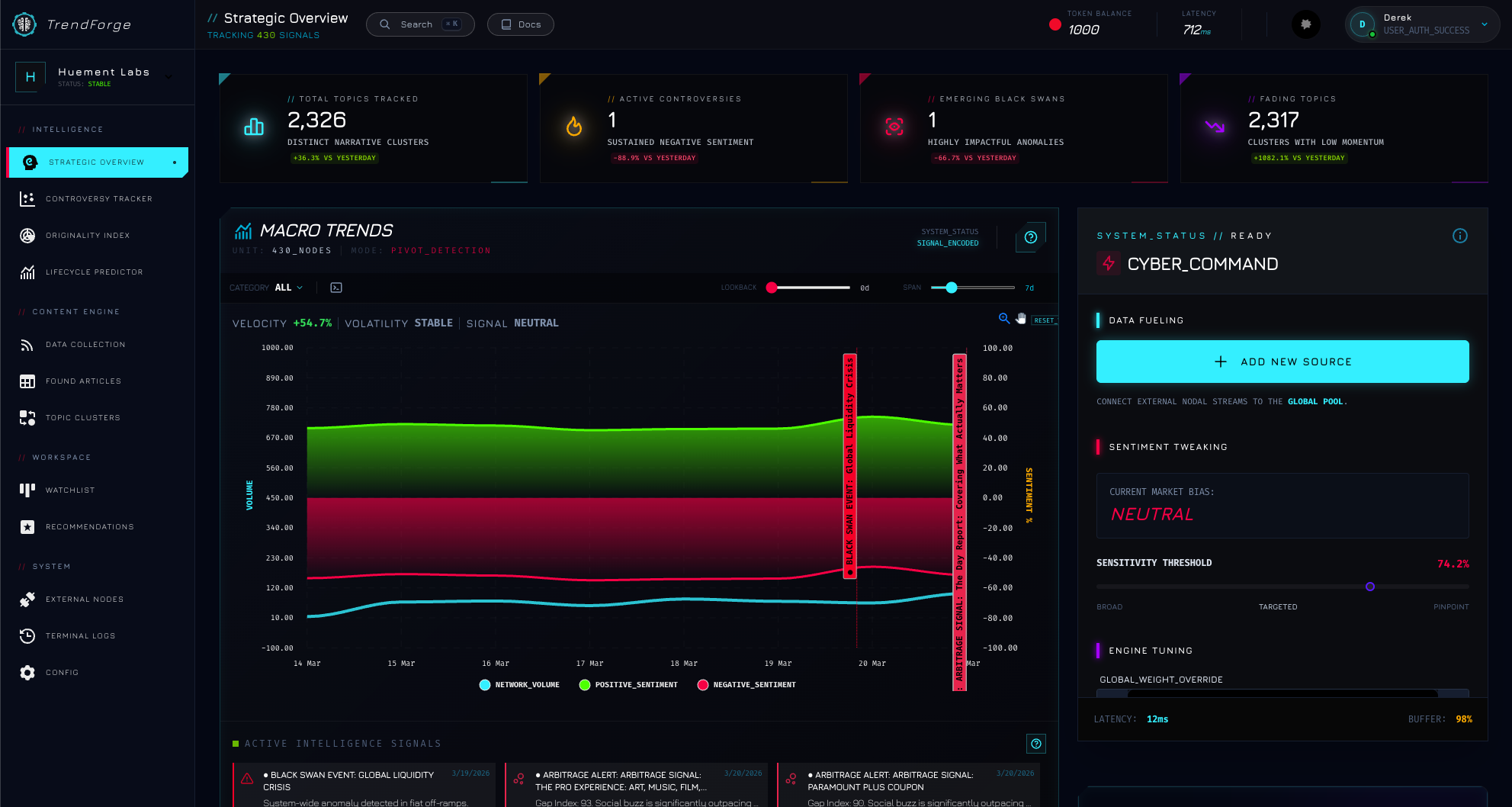
TrendForge Dashboard In Action
So before we get into that to much, I want to give a little history, a little backstory, into how I arrived at doing what you see me doing now, making this AI focused video. If you’ve seen anything else I’ve done, it’s all pretty much exclusively content about AI in one way or another. Often times, it’s reviewing some IDE or AI tool. The reason for that was, I set this channel up to teach MYSELF more about Ai and how it works, and by the power of osmosis, maybe teach someone else a little as well. Well, as time has gone on, I really started to feel like, I wasn’t doing a very good job of learning about AI. Instead, I was spending more time learning Premier Pro, and how to do character animator better, which, are really helpful skills to have, but it’s not really why I started this channel.
Another issue was, I started to get that ‘imposter syndrome’ where I didn’t think I knew enough about AI to be up here acting like I was some kind of expert that knows things. So that is the ‘headspace’ I was in, and it was kind of blocking me from making another video. In order to kinda, reassure myself (and my audience) that I was someone whose videos were worth watching, I decided to really make a concerted effort to create something technically challenging, something interesting, and most importantly, something that when built, would give me a much better understanding not only of what AI is, but how it can be used to actually do stuff.
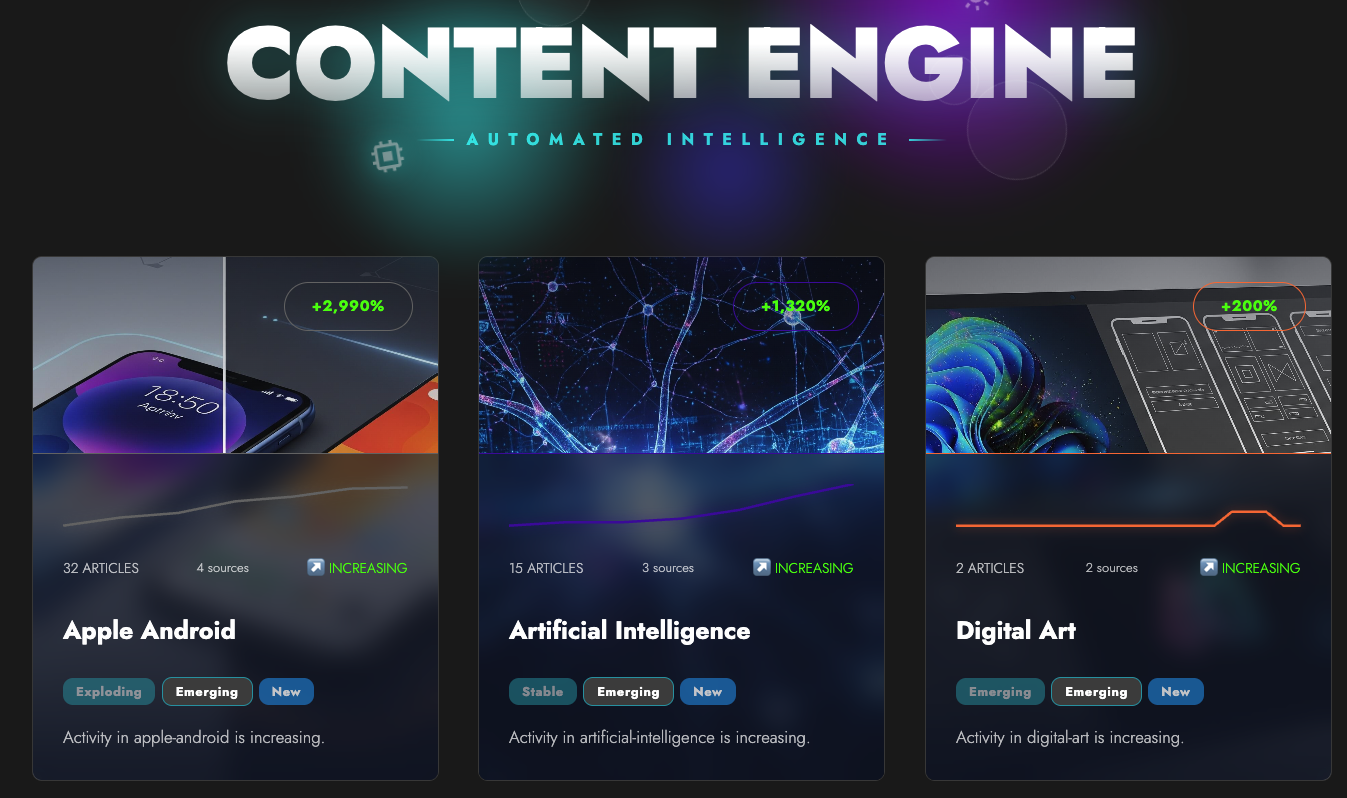
Early Attempts at monitoring trends
Here is where things start to get interesting. While I was brainstorming ideas, I took a look back at the closest thing to real AI development I had ever done, the “TrendForge”. For a while, on my blog, I’ve been using Grok to help me write articles and Google Gemini to help me come up with ‘Featured Images’ for said articles. Now technically this was using AI to do stuff, but it was a pretty base level use case, and it wasn’t anything that took more than a couple of hours to implement. Until, I decided that I wanted my Blog to have some ‘insights’. I had this idea that I would like to know when the various categories on my blog were ‘popping off’. For instance, one of the things I blog about is ’Web Development’. So if a lot of people are talking about Web Development, I thought it would be cool to know when the volume of articles was increasing or falling, as that would help me know when to release articles on the topic. So I came up with a pretty simple system for monitoring RSS feeds and computing some simple trend graphs to show how that had been changing over time. It wasn’t anything world changing, but it was pretty cool and interesting, and it gave the homepage on my blog something interesting to look at. There is a cool grid of categories, and then clicking a single category pulls up everything that has been tracked for the category.
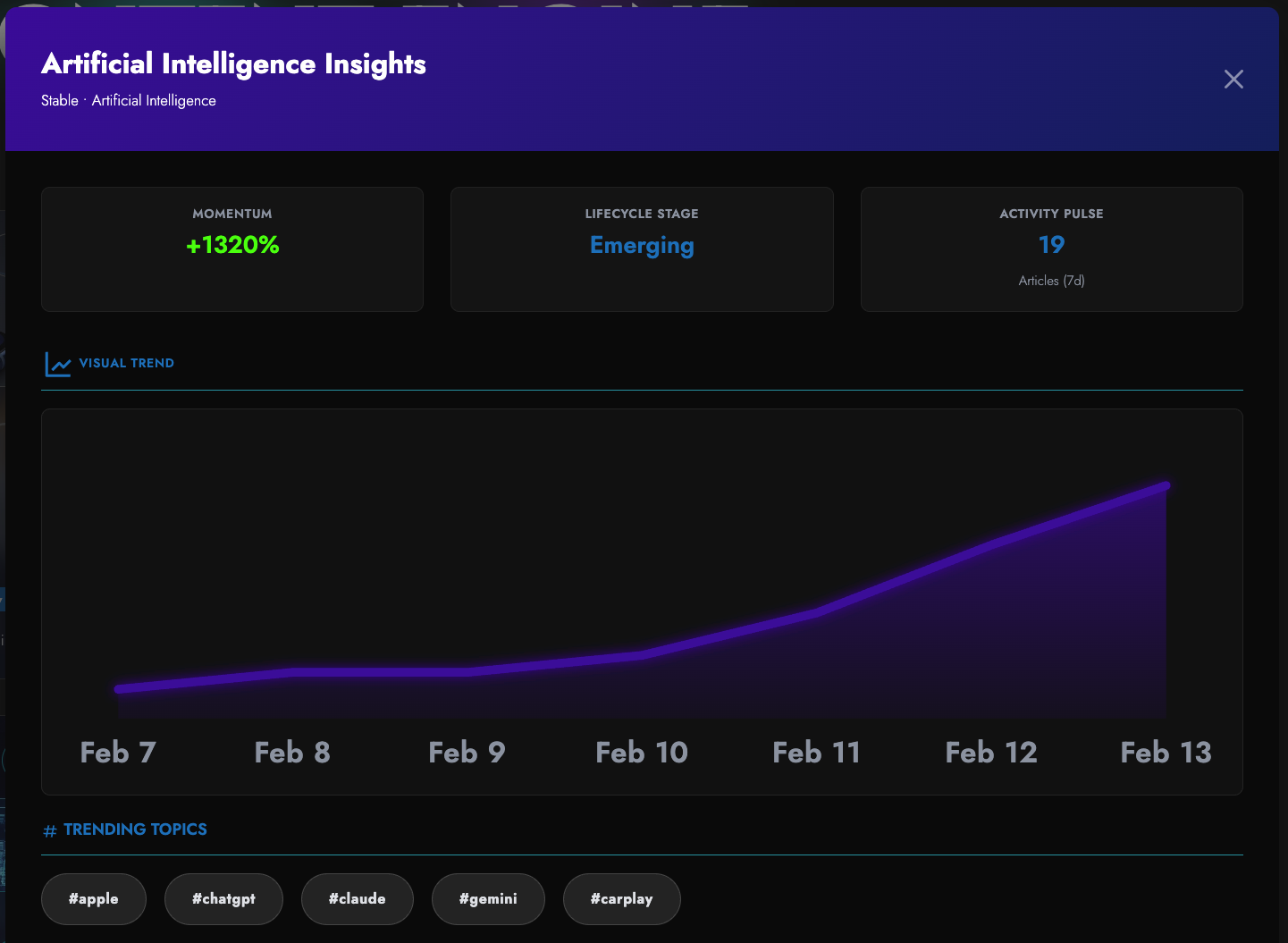
Huement Trend Modal
This is when I decided that for my next video (this video), I should attempt to code something similar, but actually make it a full application, and not just an application, but actually intelligent. I was going to attempt to not only understand what AI does, but use that knowledge to build a ‘smart’ tool. So I took the ‘half assed’ idea I had implemented on my blog, and I started to refine the idea, to workshop it, do some research and after a considerable amount of time, I started to get a pretty good handle on things. Now before we get into the ‘big reveal’ of what this new application is, let’s all get on the same page about what the heck AI even is and what id does.
What the heck is AI ?
Anyone who has used ChatGPT or any of those kinda tools, know what AI does. You give it some text, and it gives you something back, be it text, an image, a video, whatever you ‘asked’ for, it does its best to give you the answer. Now AI isn't just chatbots or image generators – but at its core, especially for Large Language Models or LLMs like GPT or Claude, it's all about math and patterns.
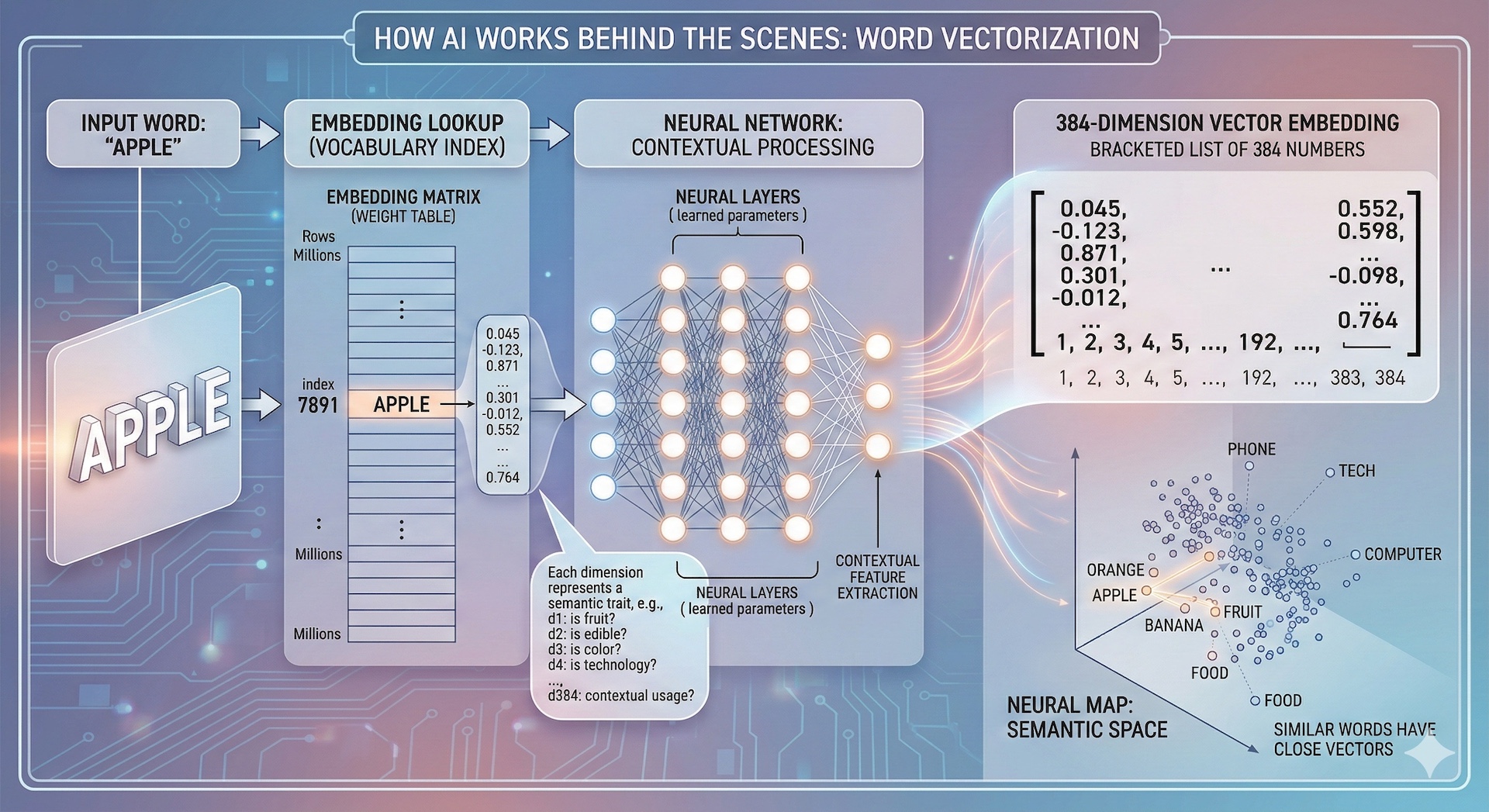
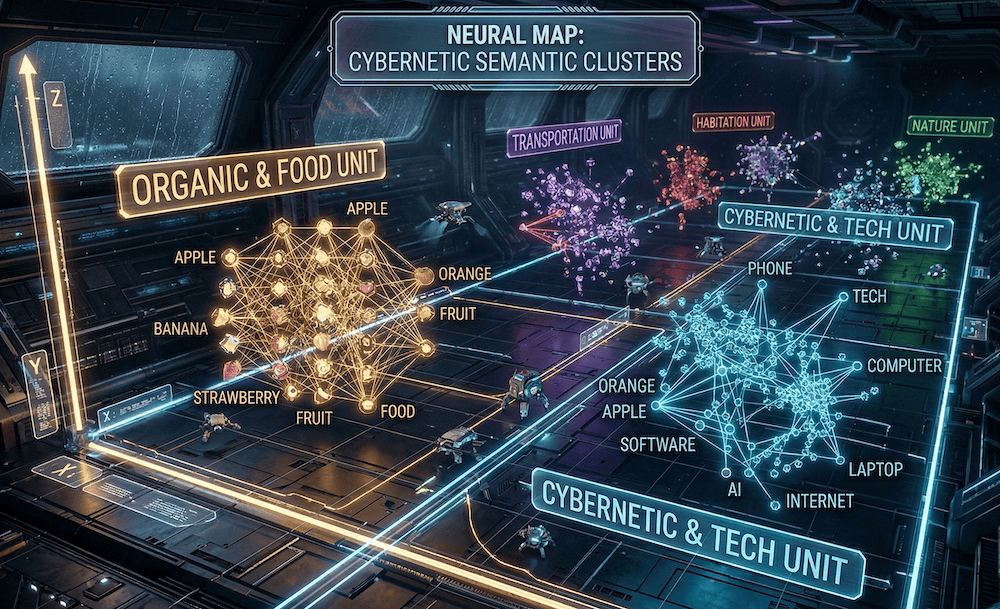
Imagine taking words or data and turning them into numbers – that's called embedding. These numbers form vectors in a high-dimensional space. Similar ideas cluster close together. For example, "apple" might be vector [0.1, 0.5, -0.2], and "banana" [0.1, 0.6, -0.1] – close in fruit space. But if "apple" is near "iPhone," its vector shifts contextually. LLMs use massive neural networks trained on billions of examples to predict the next word or answer questions by calculating probabilities. It's not magic; it's statistics on steroids. We spent hours in TRAE exploring this – generating vector embeddings for sample text and visualizing similarities with cosine distance math. If you're new to this, think of it as a giant recommendation engine for knowledge.
Not so scary
Now that you’ve heard it like that, hopefully AI is less of a mystery box. It’s actually pretty easy to understand right? So AI’s are “TRAINED” on a bunch of data, which they categorize and save and turn into these number clusters, then, when you have a question, they do the same thing to your input, they turn it into numbers, and then they can compare those numbers, with the numbers they already have, and thats how they kinda figure out what to give back to you.
Building somethings real
Now that we are all on the same page about what the heck AI even is, it’s time that we FINALLY start getting to the heart of this episode. Doing something helpful with this new found understanding. This is when I started to really dig in, and started making lists and asking questions, doing research, refining, doing more research etc. In the end, I started to come up with an idea… a skeleton' of an application if you will [Ba dum Tiss]
I wanted to create not just a silly little demo, but I wanted to create something real. Something that people might actually want to use. So without further-aude, I would like to formally introduce you all too the latest and greatest project I have ever created.
Enter MCPs and the Birth of an Idea
It was somewhere around this point that I also started to become enthralled with MCP servers. MCP stands for “Model Contex Protocol”, and in plain everyday language, it’s basically a “plugin” for AI. Basically, for a give ‘context’ you give your AI (Model) something to do (a protocol). So if I ask my AI Chatbot to make something in Figma, it can’t. It doesn’t have access to figma. HOWEVER, by adding an MCP plugin, it’s like basically installing Figma on your AI, and now your Chatbot can reply with a Figma document.
Wordpress 7.0 Lightbulb moment
Well, MCP servers are also making big waves in the Wordpress community. The latest version of Wordpress, version 7+ is adding all sorts of MCP goodness. Basically you can ‘talk’ to your Wordpress blog’s admin panel and ask it to do things like, “create summaries for each of my posts optimized for SEO and save it as the meta description”. When I was reading about that, I was like, damn, that’s awesome. Now personally, I use Statamic to power my blog, which is kinda like Wordpress’s much cooler cousin. That got me thinking, what if I came up with a cool MCP server for my blog. How cool would it be if I could ask my blog things like,
- “What topic is ‘increasing’ right now, and would be a good idea to write about?”
- “It taking whatever position about ‘category x’ a good idea, or has that been done to death?”
- “What is being discussed that isn't part of the mainstream clusters yet?"
- "Is this topic / story changing, and if so, what is the new dominant angle?"
- "What is the 'vibe' of our industry today compared to last Tuesday?"
If you’ve ever done blogging / brand management, content creation, or worked in publishing, these questions come up A LOT. Further more, people in industries like investment firm or a strategy team are ALWAYS looking for a signal in the noise. How can I write the one article that doesn't fit the current "Sea of Sameness."
So having a MCP server, an AI backed content engine that can answer those questions, that is something cool, something technically challenging to build, and, has real world use cases and value. It was at this point that I locked in, created a new repository, and got to work.
Why its interesting
Even if you are not a brand manager or investment banker, the rest of this video is going to be interesting and worth watching. Because what I’m going to show you next, is very much applicable to many MANY different variations of this kind of application. Building intelligent functions into any application is going to make your code exponentially better. Often times users want complex features that might seem impossible at first. There is a really great XKCD about first building an app where the user uploads a photo, then the user uploads a photo IF they are in a national park, then finally, the user uploads a photo in a national park IF the app identifies there is a bird in the photo. In software development, we call that scope creep, but in the real world, they call that a “must have feature”.
In the past, being able to know if there is a bird in the photo was almost impossible for a solo dev. Nowadays however, that’s old hat. AI has advanced leaps and bounds and nowadays, with what you can run locally, you would be surprised with how smart you can make your applications without burning through $$$ buying tokens. In fact, the entire budget for this application is less than $5 in AI credits.
TrendForge: High-Level Overview
TrendForge is an AI-powered tool that helps content creators escape the "Sea of Sameness" by finding unique, timely angles on trending topics before everyone else piles in. TrendForge is a smart trend radar that analyzes massive amounts of online content (news, social posts, articles), it uses AI and math to group similar ideas and track how they change over time.
- It detects gaps (what's missing in the conversation) and shifts (how the story or opinion is evolving).
- Unlike regular trend tools that only show "what's popular right now”, TrendForge reveals how the narrative is changing — that's where the real scoops, clickable angles, and thought-leadership opportunities live.
Why People Should Care (Why Use It)
Most creators suffer from Reactive Content Syndrome: they see a headline → rewrite basically the same thing → everything looks identical → low engagement.
The TrendForge fixes this by letting you:
- Spot narrative shifts (the turning points in a story) 48–72 hours before mainstream aggregators.
- Turn from a "news reporter" copying headlines into a thought leader who shapes the conversation. Never publish outdated takes.
- Exploit narrative arbitrage — profit from the timing gap between fast-moving social buzz and slower news coverage.
- Catch high-engagement signals: outrage cycles, brand-new sub-topics, black swan events, sentiment flips.
- Build long-term authority, SEO juice, backlinks, shares, comments, and loyal audience by being first, insightful, or contrarian instead of generic.
Controversy + uniqueness + perfect timing = 3× more engagement than safe, same-y content.
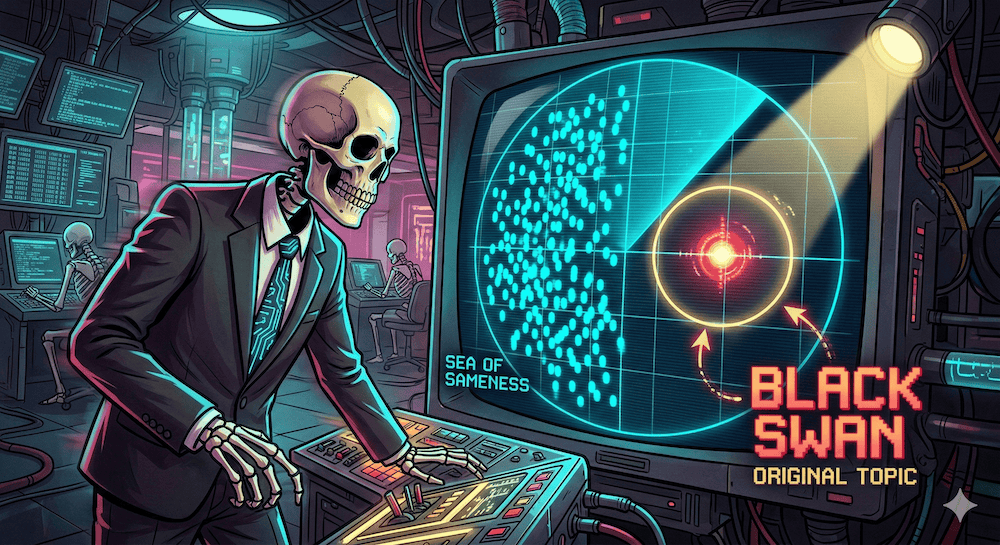
Black Swan Event Imagined!
Building an Engine
So now that you understand why we are building this, the problems we are trying to solve, hopefully you can see how these sort of complex problems that used to be basically impossible to solve, can now be ‘knocked out’ in much less time with far less resources. Dare to dream people, dare to dream. From here we are going to dive into how we build out a complex, content engine.
How It Works (Key Technical Concepts)
- Content → vectors (arrows representing meaning/sentiment) → grouped into clusters.
- Track centroids (center of each cluster). If the centroid shifts significantly day-to-day → narrative shift detected (e.g., "Apple Arcade is great!" → "Apple Arcade is losing developers").
- Measure vector distance (how mathematically "far apart" two clusters are).
- Big distance = very different ideas.
- Used for Originality Index: new cluster 80–90% distant from past 6 months = brand-new sub-topic → write the "Definitive Guide" first.
- Watch for shifts:
- Sentiment inversion (positive → negative)
- Topic pivots
- Volume spike + sentiment drop → Controversy Gap (outrage / PR crisis signal)
- Narrative arbitrage: Exploit mismatches between social speed and news lag — publish the sharper, forward-looking take first.
- Lifecycle Stage Predictor:
- Emerging → educate ("What is X?")
- Exploding → opine / aggregate ("Why everyone is talking about X")
- Maturing → analyze / controversial ("The problems with X")
- Fading → move on
The engine sends ready-to-use alerts like:
“Sentiment on [Product] souring fast — write 'Real World Problems' angle now."
Who It's For
- Niche newsletter creators — Catch black swan / unique sub-topics early, before they explode on Twitter/X.
- PR & brand managers — Spot controversy gaps or emerging crises in real time to lead (or defuse) the conversation.
- SEO strategists — Use Originality Index to find low-competition, high-growth keywords and sub-topics to dominate search.
- B2B marketers / SaaS founders — Make sure blogs, whitepapers, and campaigns match the exact lifecycle stage — never publish outdated takes.
Bottom line
If you're tired of blending into the noise and want to consistently publish the angles that actually drive engagement, authority, and growth — the TrendForge is designed to give you that unfair advantage.
So that is a LONG, VERY LONG introduction about something I am really REALLY excited about. Without explaining the ins and outs of AI and content engine, the rest of this would be really confusing. So if you have stuck with it this long, thank you, and hopefully you now have a better understanding of what AI is, and how you can make use of it.
In the next part of this, we are going to be changing gears and instead of talking about the theories and backstories, we are going to be getting our hands dirty, and diving into some real programming examples and the build log of getting the TrendForge up and running.


Comments
Add Comment
All Comments
// NO_COMMENTS_IN_BUFFER
Establish initialization protocol by creating the baseline entry trace.
System Moderation Interceptor is ON for this communication hub. All user transmission vectors must clear access protocol filtration approvals before broadcasting logs live to public network arrays.