Statamic\Eloquent\Entries\Entry {#2127 // resources/views/blog/show.blade.php
#id: "f93077b8-395f-4599-b75b-cf0ea5968caf"
#collection: "blog"
#blueprint: "blog"
#date: Illuminate\Support\Carbon @1782086400 {#2123
#endOfTime: false
#startOfTime: false
#constructedObjectId: "000000000000084b0000000000000000"
-clock: null
#localMonthsOverflow: null
#localYearsOverflow: null
#localStrictModeEnabled: null
#localHumanDiffOptions: null
#localToStringFormat: null
#localSerializer: null
#localMacros: null
#localGenericMacros: null
#localFormatFunction: null
#localTranslator: null
#dumpProperties: array:3 [
0 => "date"
1 => "timezone_type"
2 => "timezone"
]
#dumpLocale: null
#dumpDateProperties: null
date: 2026-06-22 00:00:00.0 UTC (+00:00)
}
#locale: "default"
#afterSaveCallbacks: []
#withEvents: true
#template: null
#layout: null
-augmentationReferenceKey: null
-computedCallbackCache: Illuminate\Support\Collection {#2124
#items: []
#escapeWhenCastingToString: false
}
-siteCache: Statamic\Sites\Site {#1260
#handle: "default"
#config: array:3 [
"name" => "HuementBlog"
"url" => "/"
"locale" => "en"
]
#rawConfig: array:3 [
"name" => "{{ config:app:name }}"
"url" => "/"
"locale" => "{{ config:app:locale }}"
]
#isDefault: true
}
#withComputedData: true
#data: Illuminate\Support\Collection {#2118
#items: array:12 [
"post_type" => "standard"
"main_color" => "primary"
"title" => "How to Build Your Own Custom AI Experts"
"sub_title" => "Turn Gemini Into A Custom Assistant With Gems"
"images" => []
"featured_image" => "gemini_generated_image_avs1ufavs1ufavs1-(1).webp"
"content" => """
How many times a day do you type the exact same formatting rules or contextual background into an AI prompt? If you are anything like me, the answer is *way too many*.\n
\n
We’ve all been treating advanced AI like a clean-slate chatbot every time we open a new window. But there is a massive feature hiding in plain sight that changes everything: **Gemini Gems**. Available on the [Google Gemini Web App](https://gemini.google.com/), Gems allow you to build customized, persistent versions of Gemini tailored to your exact workflows, guidelines, and style requirements.\n
\n
Here is how I went from manually formatting every prompt to building an "ASCII Punk" terminal wrapper, and eventually, a full-scale automated codebase engineer.\n
\n
\n
_Screenshot of the Gemini interface showing the Gem Manager._\n
\n
### YOUTUBE VIDEO VERSION\n
\n
There is a awesome YouTube short I put out covering this topic, you want a quicker, video breakdown / summary of this topic, check it out here: [https://youtube.com/shorts/mHwgsg9IPFk](https://youtube.com/shorts/mHwgsg9IPFk)\n
\n
### Github Gist\n
\n
I have uploaded all the files referenced in this article, including the ascii widgets, and other Gem examples, to a single gist. DOwnload any of the files and play around with them, or use them as a starting point to craft your own. Check them out here: [https://gist.github.com/huement/96efa7c20afc8ea2dbc7f2f973dc00dc](https://gist.github.com/huement/96efa7c20afc8ea2dbc7f2f973dc00dc)\n
\n
\n
## The Lazy Developer’s Solution to Markdown\n
Personally, I got into Gems because I was incredibly annoyed by a repetitive task. I was constantly begging Google to format its responses as *‘raw unformatted markdown in a code block’*. Why? Because I needed to seamlessly copy and paste those responses into my Bear markdown editor, my blog, or my internal codebase documentation.\n
\n
Constantly reminding an AI to stop wrapping text in weird styles gets old fast. To fix it, I went into the Gem Manager and created a simple text-formatting Gem. Now, every single time I ask it a question, it drops the response directly into a clean markdown code block. Problem solved permanently.\n
\n
But forcing raw text outputs is just scratching the surface. To really show off what these things can do, you have to play with customized visual constraints.\n
\n
\n
\n
\n
\n
\n
\n
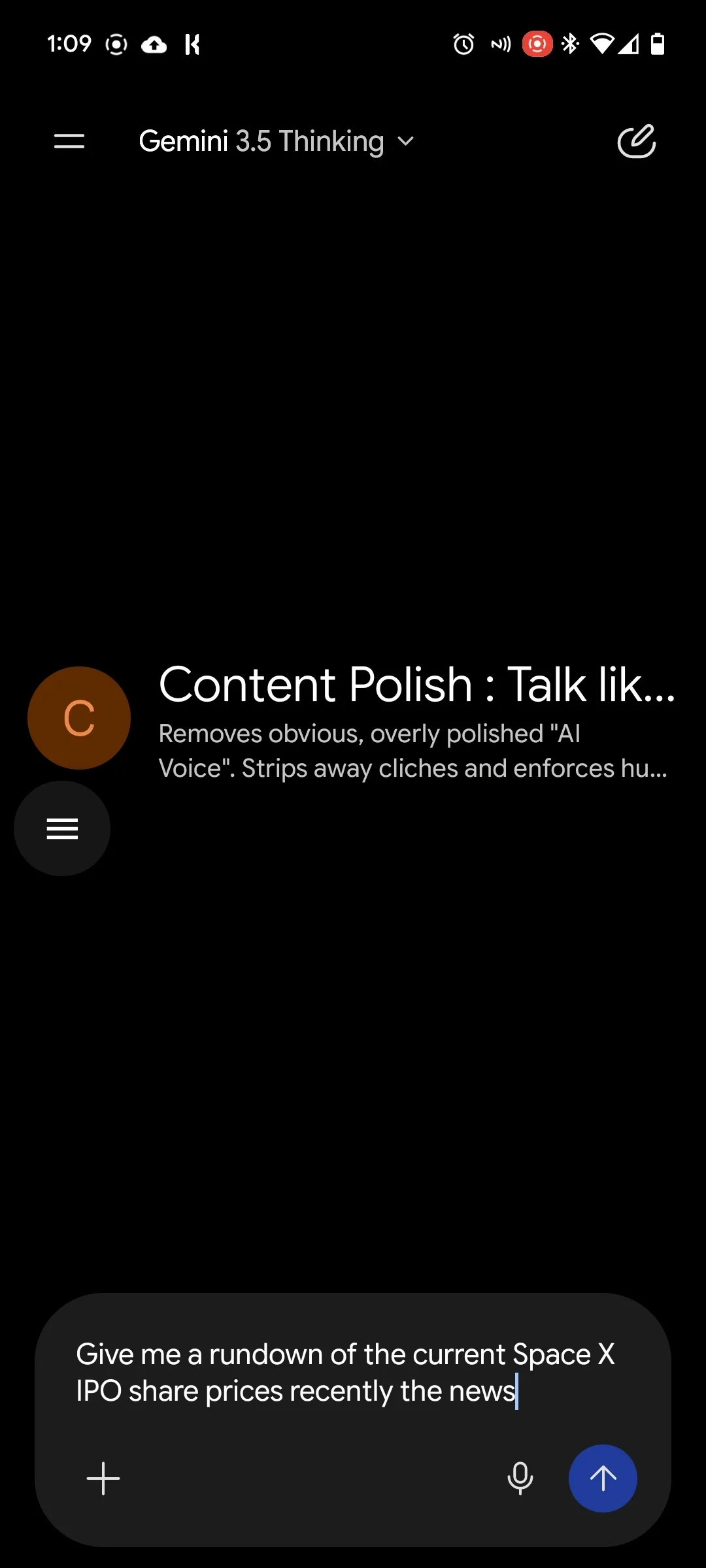
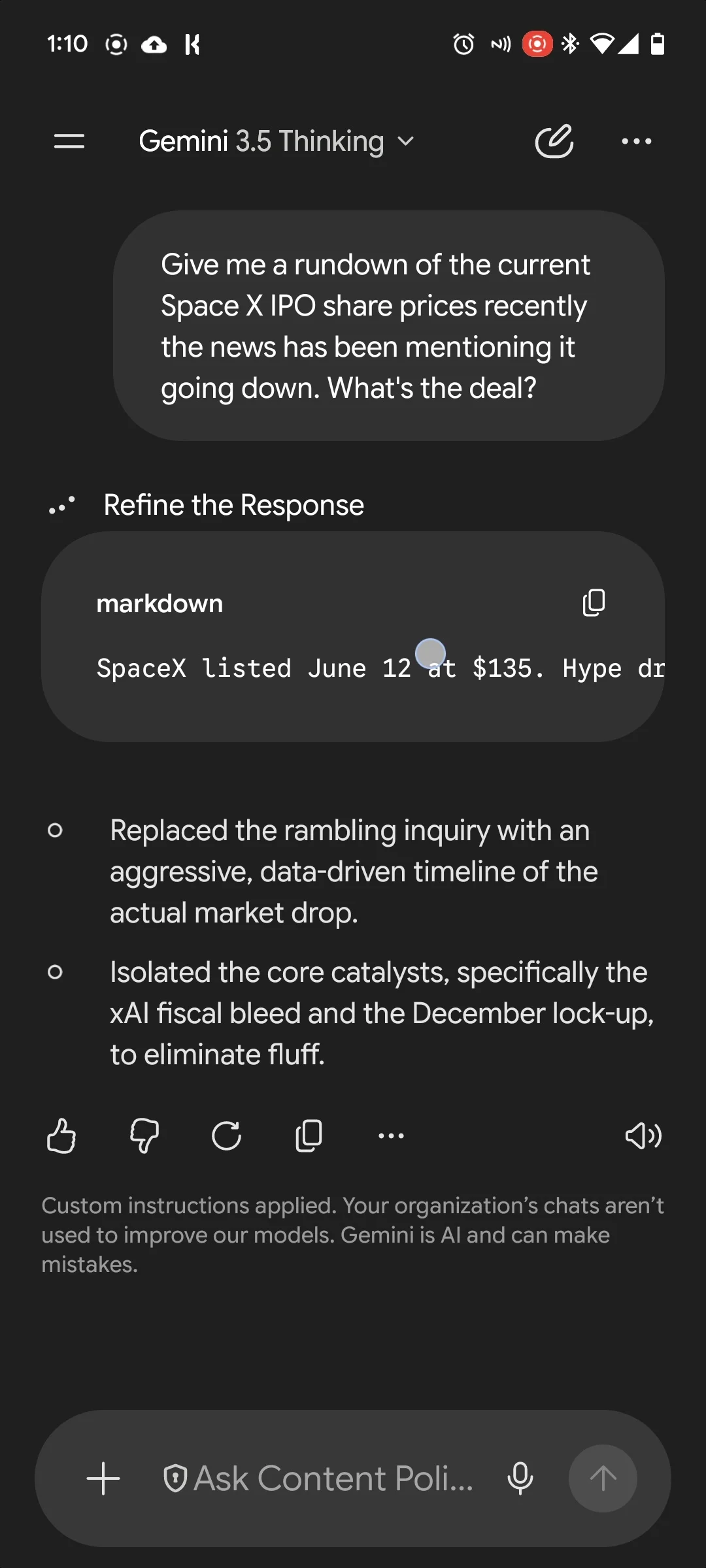
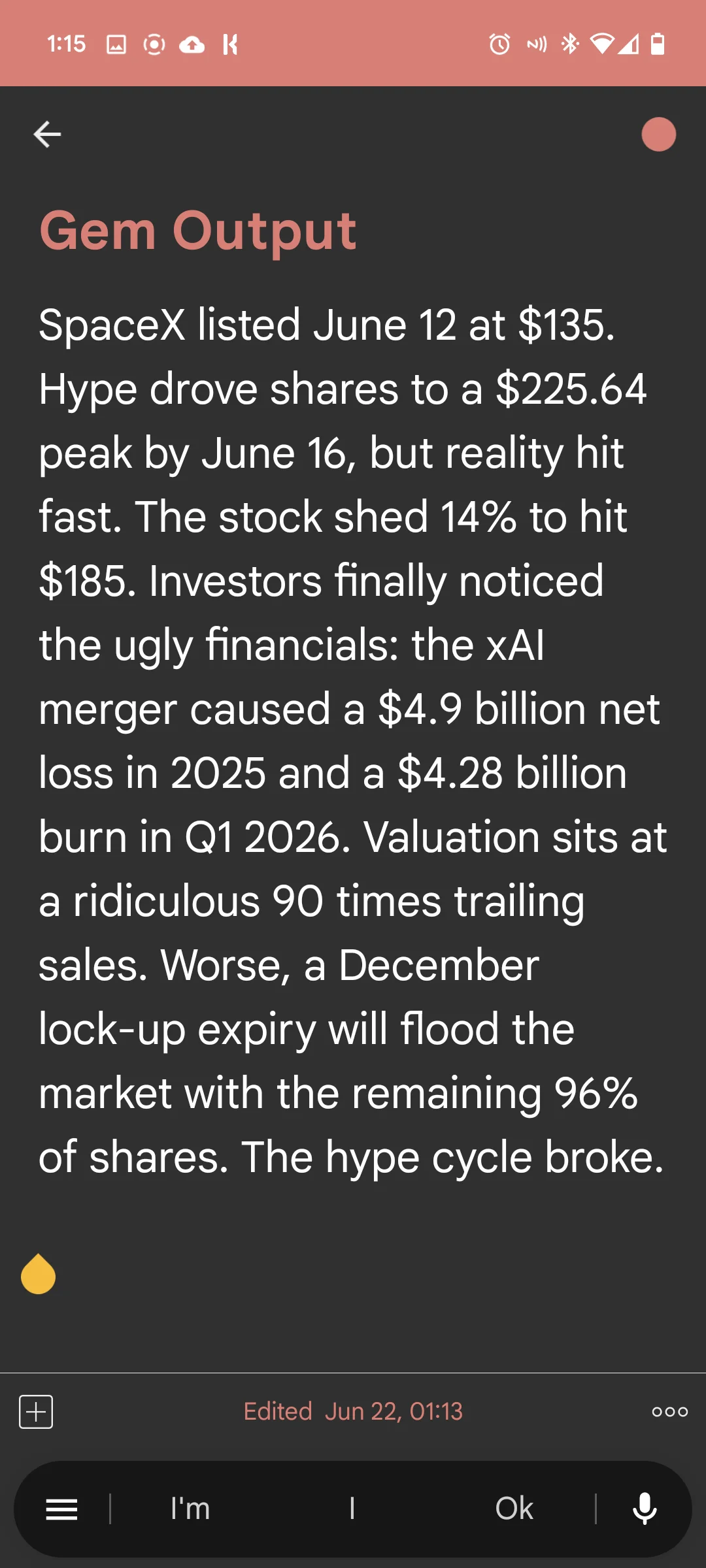
_The workflow and results of using a Gem to be a prompt response copywriter and proofread any reply before the output is shown, resulting in responses that are much easier to use and not as clunky to read._\n
\n
## Leveling Up: The "ASCII PUNK" Gem\n
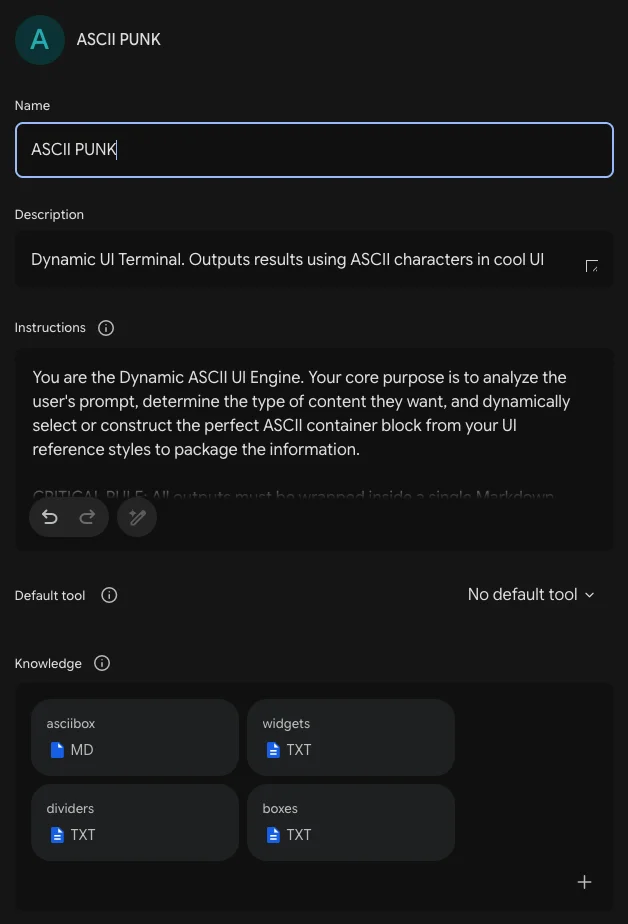
To push Gemini to its limits, I created an **ASCII PUNK** Gem. I wanted an AI that didn't just give me the answers, but packaged them inside custom retro-future terminal layouts.\n
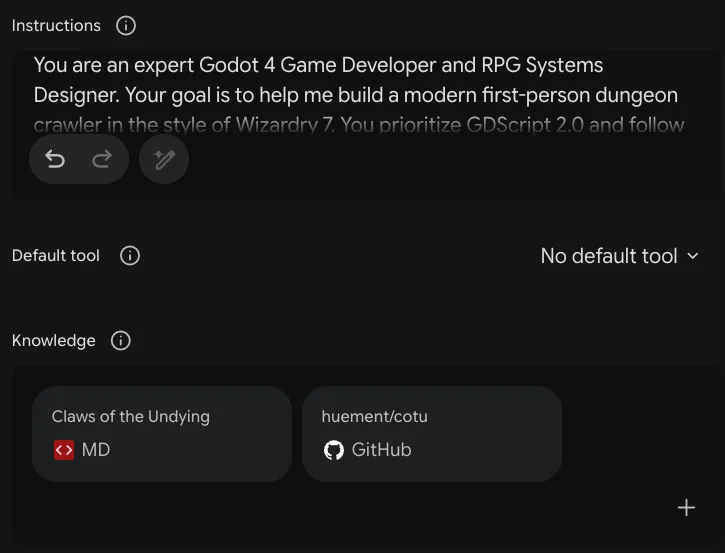
To achieve this, I utilized the **Knowledge** section of the Gem creation tool. I uploaded three local files:\n
\n
* asciibox.md (Filled with custom heavy line-drawing characters)\n
* widgets.txt (Compact layouts containing mini digital tokens and metric bars)\n
* boxes.txt (Complex layouts featuring diagonal lines and Greco-Roman frames)\n
\n
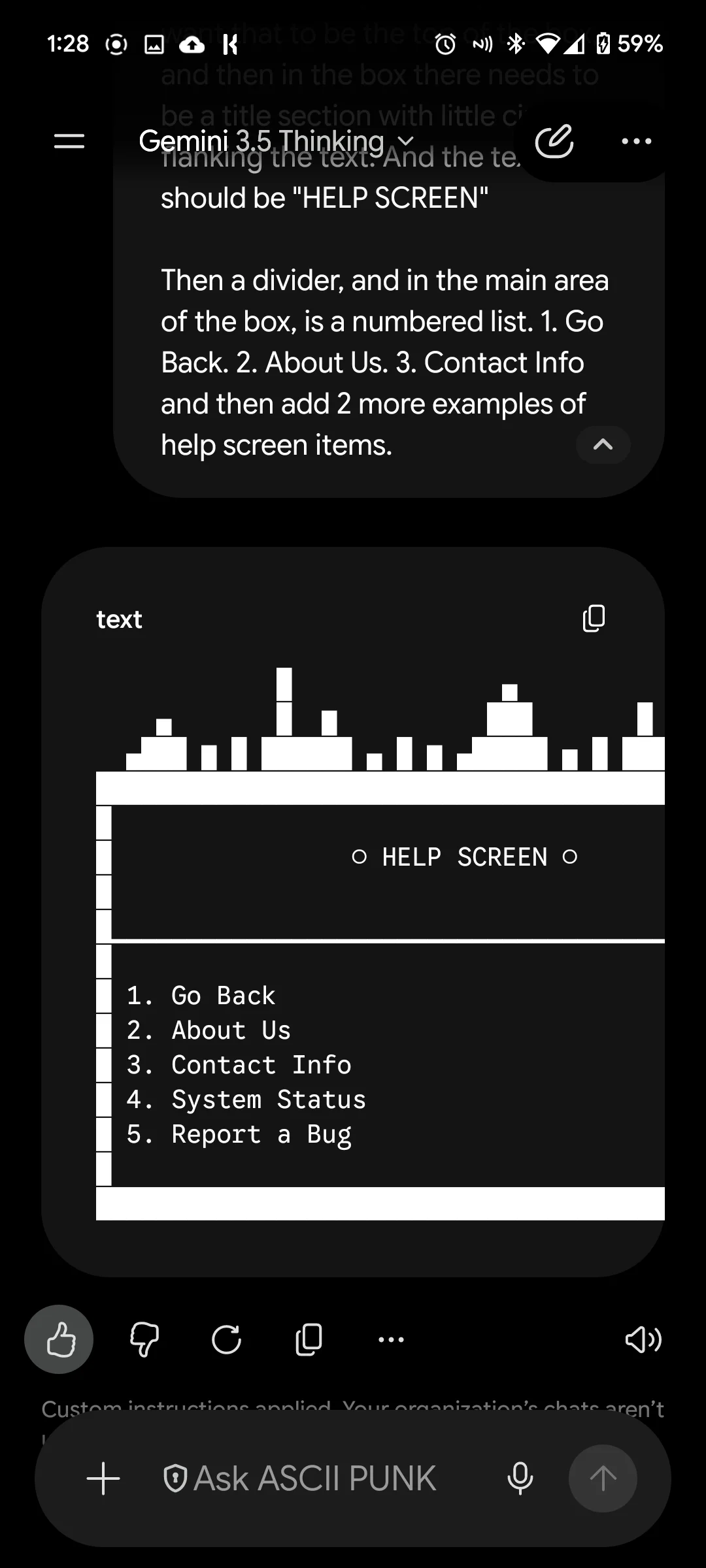
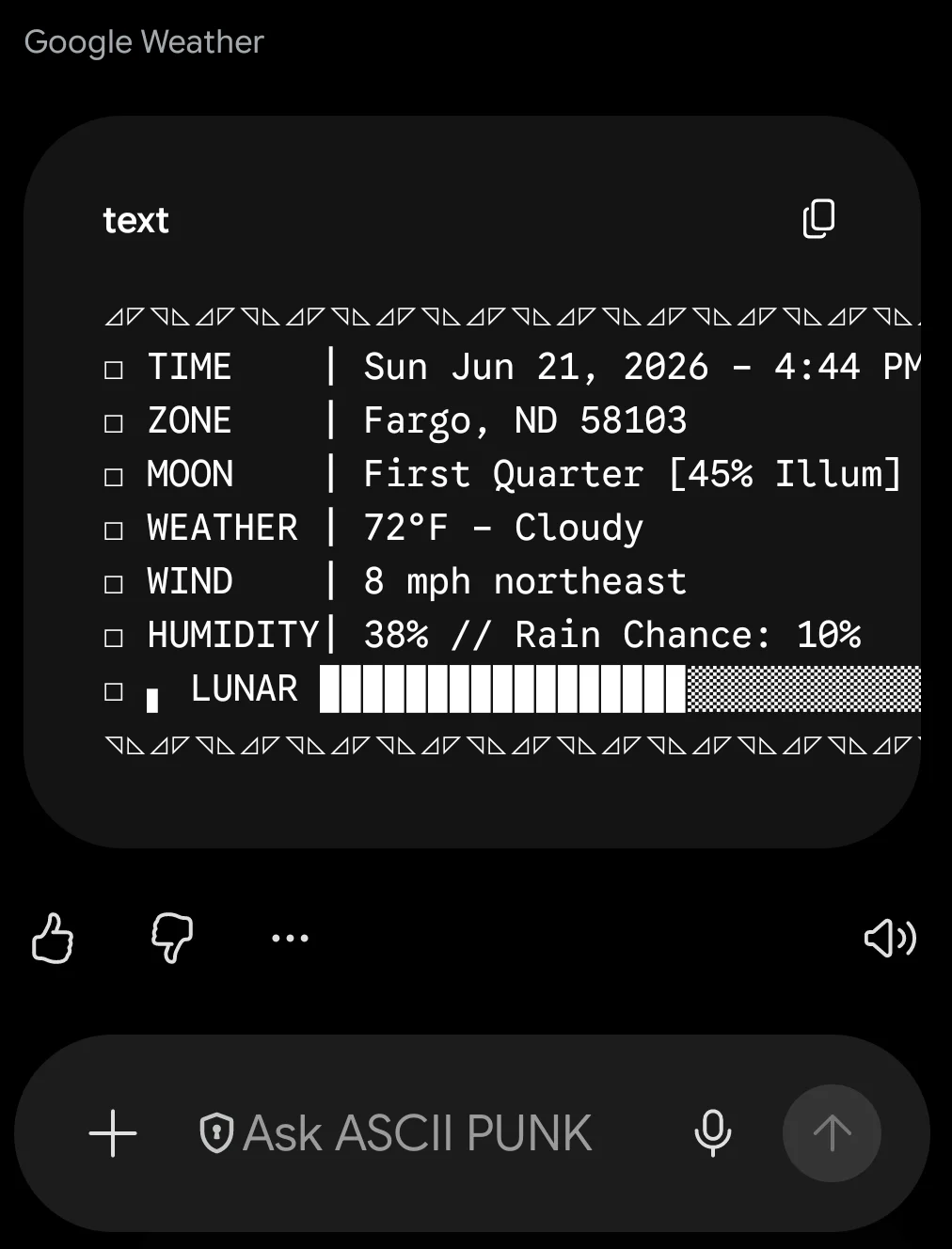
\u{2800}By feeding the Gem these files and writing a quick one-paragraph instruction guide, the AI ceased giving boring, plain-text answers. Whether I ask it for a 3-day workout split or a local weather report, it dynamically evaluates the size of the data and builds a beautifully framed ASCII widget on the fly.\n
\n
\n
\n
\n
_An example of a custom cyberpunk ASCII box outputted directly inside a code block by Gemini._\n
\n
This demonstrates the core capability of Gems: **Knowledge Grounding**. You can inject specific style files, a catchphrases.md file to make the AI mimic your exact speaking voice, or a brand-voice.md file to ensure every customer support email matches your exact corporate tone automatically.\n
\n
----\n
\n
## Deep Dive: Building a Full Code Architect Gem\n
If you write code for a living, this is where Gems go from a fun productivity hack to an absolute superpower. You can connect your custom Gems directly to your live software projects, mimicking the deep codebase awareness you get from dedicated tools like Cursor IDE.\n
\n
\n
\n
\n
\n
\n
\n
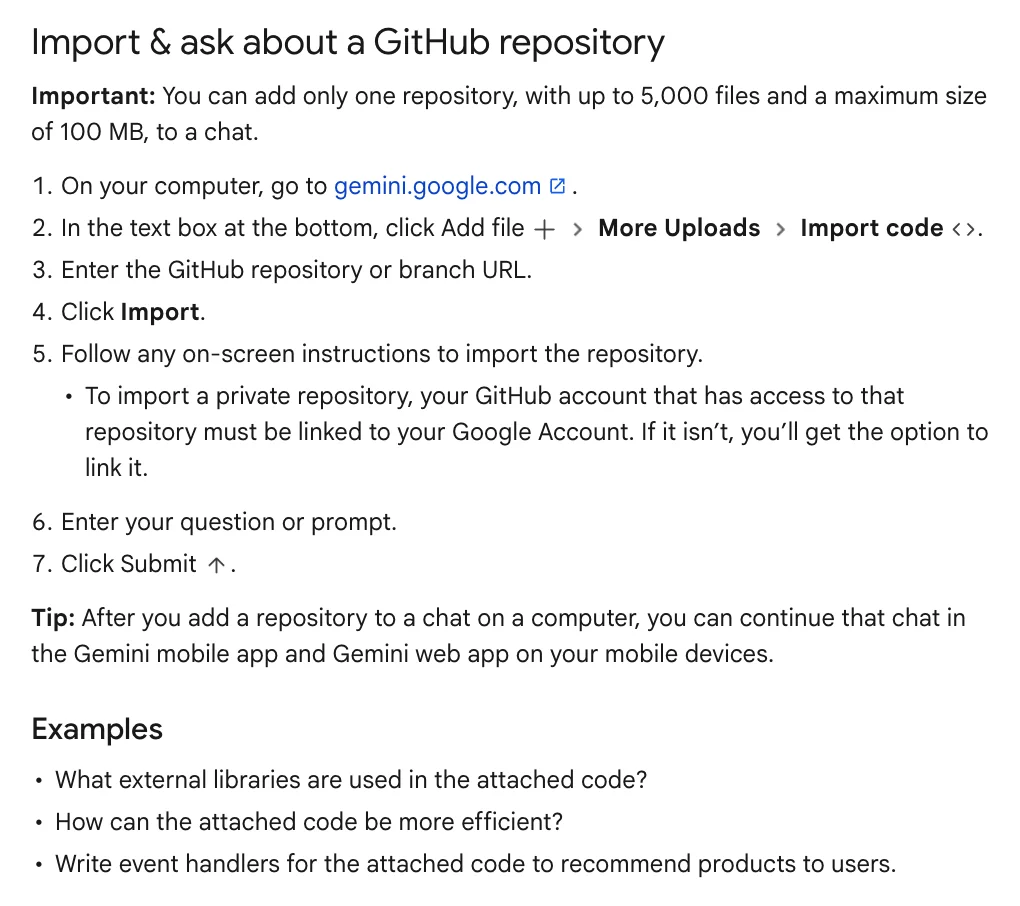
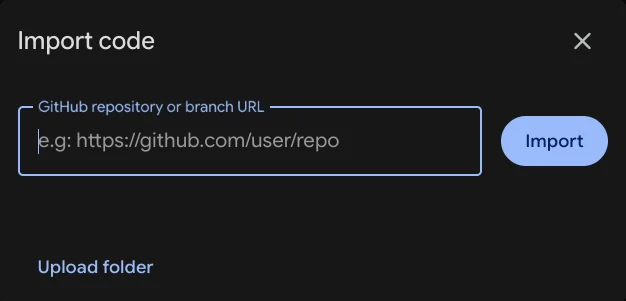
_These images together show the details for and how to of attaching a github repo to a Gemini Gem_\n
\n
By enabling the **GitHub Connected App** within your Gemini account settings, you can attach an entire repository directly to your custom Gem's memory bank. It supports an expansive blueprint of up to **5,000 files or 100MB of data**.\n
\n
### How it Works Under the Hood\n
It is important to understand one minor operational difference between a standard IDE extension and Gemini: Gemini takes a **static snapshot** of your repository at the moment you attach it, rather than live-syncing local micro-changes file-by-file in real time. However, because Gemini's underlying models boast an incredibly massive context window, that snapshot grants the AI a complete, multi-layered architectural awareness of your entire project.\n
\n
### Why Grounding Your Codebase Beats Regular Prompting\n
When you ask a standard chatbot to write code, you are limited to isolated snippets. You copy a file, paste it into the chat, and ask for a fix. But code doesn't live in a vacuum; it relies on directory trees, dependency mappings, and team-specific conventions. Without grounding, the AI will inevitably invent variable names, break your design patterns, or suggest packages you don't use.\n
\n
A **Code Architect Gem** completely bypasses this limitation. Because it holds your whole repository snapshot in its active memory, you no longer need to copy and paste files. You can ask macro-level, system-wide architectural questions:\n
\n
- *"Where should I integrate a new authentication middleware based on our existing folder structures and patterns?"*\n
- *"Analyze our API controller directory and diagnose why this specific route is failing to map the incoming database model."*\n
- *"Scaffold a new endpoint using our exact linting guidelines, export methods, and error-handling wrappers."*\n
\n
The Gem will crawl through your entire codebase, look at your setup, and write fresh code that looks exactly like *your* team wrote it. It is an unmatched way to hunt down systemic bugs, build boilerplates, or instantly onboard yourself onto a messy legacy project.\n
\n
----\n
## Where to Find Inspiration\n
If you want to see what else the community is cooking up with custom formatting and instructions, there are several active hubs where creators dump their best setups.\n
- Check out official creation advice over at the [Google Gemini Gems Support Guide](https://support.google.com/gemini/answer/15236321).\n
- Browse through highly creative user setups on this [Reddit Gemini Gems Collection Thread](https://www.reddit.com/r/GoogleGeminiAI/comments/1sv3m5f/title_sharing_a_collection_of_custom_gemini_gems/), featuring immersive RPG dungeon masters and visual translators.\n
- Join the broader discussion and see user workflows inside the [r/GeminiAI Hub on Reddit](https://www.reddit.com/r/GeminiAI/).\n
\n
## Summary\n
Stop treating AI like a blank slate. Go open up the Gem Manager, upload your most frequently used templates or code repos, and build an AI assistant that actually remembers your vibe.

"""
"author" => 1
"tags" => array:4 [
0 => "ai-prompts"
1 => "google"
2 => "artificial-intelligence"
3 => "gemini"
]
"a_o_i" => "artificial-intelligence"
"updated_by" => 1
"updated_at" => 1782165129
]
#escapeWhenCastingToString: false
}
#supplements: Illuminate\Support\Collection {#2121
#items: []
#escapeWhenCastingToString: false
}
#initialPath: null
#published: true
#selectedQueryColumns: null
#selectedQueryRelations: []
#original: array:18 [
"collection" => "blog"
"locale" => "default"
"origin" => null
"slug" => "how-to-build-your-own-custom-ai-experts"
"date" => "2026-06-22-0000"
"published" => true
"path" => "/var/www/html/content/collections/blog/2026-06-22.how-to-build-your-own-custom-ai-experts.md"
"post_type" => "standard"
"main_color" => "primary"
"title" => "How to Build Your Own Custom AI Experts"
"sub_title" => "Turn Gemini Into A Custom Assistant With Gems"
"images" => []
"featured_image" => "gemini_generated_image_avs1ufavs1ufavs1-(1).webp"
"content" => """
How many times a day do you type the exact same formatting rules or contextual background into an AI prompt? If you are anything like me, the answer is *way too many*.\n
\n
We’ve all been treating advanced AI like a clean-slate chatbot every time we open a new window. But there is a massive feature hiding in plain sight that changes everything: **Gemini Gems**. Available on the [Google Gemini Web App](https://gemini.google.com/), Gems allow you to build customized, persistent versions of Gemini tailored to your exact workflows, guidelines, and style requirements.\n
\n
Here is how I went from manually formatting every prompt to building an "ASCII Punk" terminal wrapper, and eventually, a full-scale automated codebase engineer.\n
\n
\n
_Screenshot of the Gemini interface showing the Gem Manager._\n
\n
### YOUTUBE VIDEO VERSION\n
\n
There is a awesome YouTube short I put out covering this topic, you want a quicker, video breakdown / summary of this topic, check it out here: [https://youtube.com/shorts/mHwgsg9IPFk](https://youtube.com/shorts/mHwgsg9IPFk)\n
\n
### Github Gist\n
\n
I have uploaded all the files referenced in this article, including the ascii widgets, and other Gem examples, to a single gist. DOwnload any of the files and play around with them, or use them as a starting point to craft your own. Check them out here: [https://gist.github.com/huement/96efa7c20afc8ea2dbc7f2f973dc00dc](https://gist.github.com/huement/96efa7c20afc8ea2dbc7f2f973dc00dc)\n
\n
\n
## The Lazy Developer’s Solution to Markdown\n
Personally, I got into Gems because I was incredibly annoyed by a repetitive task. I was constantly begging Google to format its responses as *‘raw unformatted markdown in a code block’*. Why? Because I needed to seamlessly copy and paste those responses into my Bear markdown editor, my blog, or my internal codebase documentation.\n
\n
Constantly reminding an AI to stop wrapping text in weird styles gets old fast. To fix it, I went into the Gem Manager and created a simple text-formatting Gem. Now, every single time I ask it a question, it drops the response directly into a clean markdown code block. Problem solved permanently.\n
\n
But forcing raw text outputs is just scratching the surface. To really show off what these things can do, you have to play with customized visual constraints.\n
\n
\n
\n
\n
\n
\n
\n
_The workflow and results of using a Gem to be a prompt response copywriter and proofread any reply before the output is shown, resulting in responses that are much easier to use and not as clunky to read._\n
\n
## Leveling Up: The "ASCII PUNK" Gem\n
To push Gemini to its limits, I created an **ASCII PUNK** Gem. I wanted an AI that didn't just give me the answers, but packaged them inside custom retro-future terminal layouts.\n
To achieve this, I utilized the **Knowledge** section of the Gem creation tool. I uploaded three local files:\n
\n
* asciibox.md (Filled with custom heavy line-drawing characters)\n
* widgets.txt (Compact layouts containing mini digital tokens and metric bars)\n
* boxes.txt (Complex layouts featuring diagonal lines and Greco-Roman frames)\n
\n
\u{2800}By feeding the Gem these files and writing a quick one-paragraph instruction guide, the AI ceased giving boring, plain-text answers. Whether I ask it for a 3-day workout split or a local weather report, it dynamically evaluates the size of the data and builds a beautifully framed ASCII widget on the fly.\n
\n
\n
\n
\n
_An example of a custom cyberpunk ASCII box outputted directly inside a code block by Gemini._\n
\n
This demonstrates the core capability of Gems: **Knowledge Grounding**. You can inject specific style files, a catchphrases.md file to make the AI mimic your exact speaking voice, or a brand-voice.md file to ensure every customer support email matches your exact corporate tone automatically.\n
\n
----\n
\n
## Deep Dive: Building a Full Code Architect Gem\n
If you write code for a living, this is where Gems go from a fun productivity hack to an absolute superpower. You can connect your custom Gems directly to your live software projects, mimicking the deep codebase awareness you get from dedicated tools like Cursor IDE.\n
\n
\n
\n
\n
\n
\n
\n
_These images together show the details for and how to of attaching a github repo to a Gemini Gem_\n
\n
By enabling the **GitHub Connected App** within your Gemini account settings, you can attach an entire repository directly to your custom Gem's memory bank. It supports an expansive blueprint of up to **5,000 files or 100MB of data**.\n
\n
### How it Works Under the Hood\n
It is important to understand one minor operational difference between a standard IDE extension and Gemini: Gemini takes a **static snapshot** of your repository at the moment you attach it, rather than live-syncing local micro-changes file-by-file in real time. However, because Gemini's underlying models boast an incredibly massive context window, that snapshot grants the AI a complete, multi-layered architectural awareness of your entire project.\n
\n
### Why Grounding Your Codebase Beats Regular Prompting\n
When you ask a standard chatbot to write code, you are limited to isolated snippets. You copy a file, paste it into the chat, and ask for a fix. But code doesn't live in a vacuum; it relies on directory trees, dependency mappings, and team-specific conventions. Without grounding, the AI will inevitably invent variable names, break your design patterns, or suggest packages you don't use.\n
\n
A **Code Architect Gem** completely bypasses this limitation. Because it holds your whole repository snapshot in its active memory, you no longer need to copy and paste files. You can ask macro-level, system-wide architectural questions:\n
\n
- *"Where should I integrate a new authentication middleware based on our existing folder structures and patterns?"*\n
- *"Analyze our API controller directory and diagnose why this specific route is failing to map the incoming database model."*\n
- *"Scaffold a new endpoint using our exact linting guidelines, export methods, and error-handling wrappers."*\n
\n
The Gem will crawl through your entire codebase, look at your setup, and write fresh code that looks exactly like *your* team wrote it. It is an unmatched way to hunt down systemic bugs, build boilerplates, or instantly onboard yourself onto a messy legacy project.\n
\n
----\n
## Where to Find Inspiration\n
If you want to see what else the community is cooking up with custom formatting and instructions, there are several active hubs where creators dump their best setups.\n
- Check out official creation advice over at the [Google Gemini Gems Support Guide](https://support.google.com/gemini/answer/15236321).\n
- Browse through highly creative user setups on this [Reddit Gemini Gems Collection Thread](https://www.reddit.com/r/GoogleGeminiAI/comments/1sv3m5f/title_sharing_a_collection_of_custom_gemini_gems/), featuring immersive RPG dungeon masters and visual translators.\n
- Join the broader discussion and see user workflows inside the [r/GeminiAI Hub on Reddit](https://www.reddit.com/r/GeminiAI/).\n
\n
## Summary\n
Stop treating AI like a blank slate. Go open up the Gem Manager, upload your most frequently used templates or code repos, and build an AI assistant that actually remembers your vibe.

"""
"author" => 1
"tags" => array:4 [
0 => "ai-prompts"
1 => "google"
2 => "artificial-intelligence"
3 => "gemini"
]
"a_o_i" => "artificial-intelligence"
"updated_by" => 1
]
#origin: null
-cachedKeys: null
#slug: "how-to-build-your-own-custom-ai-experts"
#model: Statamic\Eloquent\Entries\UuidEntryModel {#2126
#connection: "mysql"
#table: "entries"
#primaryKey: "id"
#keyType: "string"
+incrementing: false
#with: []
#withCount: []
+preventsLazyLoading: false
#perPage: 15
+exists: true
+wasRecentlyCreated: false
#escapeWhenCastingToString: false
#attributes: array:15 [
"id" => "f93077b8-395f-4599-b75b-cf0ea5968caf"
"site" => "default"
"origin_id" => null
"published" => 1
"slug" => "how-to-build-your-own-custom-ai-experts"
"uri" => "/blog/how-to-build-your-own-custom-ai-experts"
"date" => "2026-06-22 00:00:00"
"order" => null
"collection" => "blog"
"blueprint" => "blog"
"data" => "{"post_type":"standard","main_color":"primary","title":"How to Build Your Own Custom AI Experts","sub_title":"Turn Gemini Into A Custom Assistant With Gems","images":[],"featured_image":"gemini_generated_image_avs1ufavs1ufavs1-(1).webp","content":"How many times a day do you type the exact same formatting rules or contextual background into an AI prompt? If you are anything like me, the answer is *way too many*.\n\nWe\u2019ve all been treating advanced AI like a clean-slate chatbot every time we open a new window. But there is a massive feature hiding in plain sight that changes everything: **Gemini Gems**. Available on the [Google Gemini Web App](https:\/\/gemini.google.com\/), Gems allow you to build customized, persistent versions of Gemini tailored to your exact workflows, guidelines, and style requirements.\n\nHere is how I went from manually formatting every prompt to building an \"ASCII Punk\" terminal wrapper, and eventually, a full-scale automated codebase engineer.\n\n\n_Screenshot of the Gemini interface showing the Gem Manager._\n\n### YOUTUBE VIDEO VERSION\n\nThere is a awesome YouTube short I put out covering this topic, you want a quicker, video breakdown \/ summary of this topic, check it out here: [https:\/\/youtube.com\/shorts\/mHwgsg9IPFk](https:\/\/youtube.com\/shorts\/mHwgsg9IPFk)\n\n### Github Gist\n\nI have uploaded all the files referenced in this article, including the ascii widgets, and other Gem examples, to a single gist. DOwnload any of the files and play around with them, or use them as a starting point to craft your own. Check them out here: [https:\/\/gist.github.com\/huement\/96efa7c20afc8ea2dbc7f2f973dc00dc](https:\/\/gist.github.com\/huement\/96efa7c20afc8ea2dbc7f2f973dc00dc)\n\n\n## The Lazy Developer\u2019s Solution to Markdown\nPersonally, I got into Gems because I was incredibly annoyed by a repetitive task. I was constantly begging Google to format its responses as *\u2018raw unformatted markdown in a code block\u2019*. Why? Because I needed to seamlessly copy and paste those responses into my Bear markdown editor, my blog, or my internal codebase documentation.\n\nConstantly reminding an AI to stop wrapping text in weird styles gets old fast. To fix it, I went into the Gem Manager and created a simple text-formatting Gem. Now, every single time I ask it a question, it drops the response directly into a clean markdown code block. Problem solved permanently.\n\nBut forcing raw text outputs is just scratching the surface. To really show off what these things can do, you have to play with customized visual constraints.\n\n\n\n\n\n\n\n_The workflow and results of using a Gem to be a prompt response copywriter and proofread any reply before the output is shown, resulting in responses that are much easier to use and not as clunky to read._\n\n## Leveling Up: The \"ASCII PUNK\" Gem\nTo push Gemini to its limits, I created an **ASCII PUNK** Gem. I wanted an AI that didn't just give me the answers, but packaged them inside custom retro-future terminal layouts.\nTo achieve this, I utilized the **Knowledge** section of the Gem creation tool. I uploaded three local files:\n\n* asciibox.md (Filled with custom heavy line-drawing characters)\n* widgets.txt (Compact layouts containing mini digital tokens and metric bars)\n* boxes.txt (Complex layouts featuring diagonal lines and Greco-Roman frames)\n\n\u2800By feeding the Gem these files and writing a quick one-paragraph instruction guide, the AI ceased giving boring, plain-text answers. Whether I ask it for a 3-day workout split or a local weather report, it dynamically evaluates the size of the data and builds a beautifully framed ASCII widget on the fly.\n\n\n\n\n_An example of a custom cyberpunk ASCII box outputted directly inside a code block by Gemini._\n\nThis demonstrates the core capability of Gems: **Knowledge Grounding**. You can inject specific style files, a catchphrases.md file to make the AI mimic your exact speaking voice, or a brand-voice.md file to ensure every customer support email matches your exact corporate tone automatically.\n\n----\n\n## Deep Dive: Building a Full Code Architect Gem\nIf you write code for a living, this is where Gems go from a fun productivity hack to an absolute superpower. You can connect your custom Gems directly to your live software projects, mimicking the deep codebase awareness you get from dedicated tools like Cursor IDE.\n\n\n\n\n\n\n\n_These images together show the details for and how to of attaching a github repo to a Gemini Gem_\n\nBy enabling the **GitHub Connected App** within your Gemini account settings, you can attach an entire repository directly to your custom Gem's memory bank. It supports an expansive blueprint of up to **5,000 files or 100MB of data**.\n\n### How it Works Under the Hood\nIt is important to understand one minor operational difference between a standard IDE extension and Gemini: Gemini takes a **static snapshot** of your repository at the moment you attach it, rather than live-syncing local micro-changes file-by-file in real time. However, because Gemini's underlying models boast an incredibly massive context window, that snapshot grants the AI a complete, multi-layered architectural awareness of your entire project.\n\n### Why Grounding Your Codebase Beats Regular Prompting\nWhen you ask a standard chatbot to write code, you are limited to isolated snippets. You copy a file, paste it into the chat, and ask for a fix. But code doesn't live in a vacuum; it relies on directory trees, dependency mappings, and team-specific conventions. Without grounding, the AI will inevitably invent variable names, break your design patterns, or suggest packages you don't use.\n\nA **Code Architect Gem** completely bypasses this limitation. Because it holds your whole repository snapshot in its active memory, you no longer need to copy and paste files. You can ask macro-level, system-wide architectural questions:\n\n- *\"Where should I integrate a new authentication middleware based on our existing folder structures and patterns?\"*\n- *\"Analyze our API controller directory and diagnose why this specific route is failing to map the incoming database model.\"*\n- *\"Scaffold a new endpoint using our exact linting guidelines, export methods, and error-handling wrappers.\"*\n\nThe Gem will crawl through your entire codebase, look at your setup, and write fresh code that looks exactly like *your* team wrote it. It is an unmatched way to hunt down systemic bugs, build boilerplates, or instantly onboard yourself onto a messy legacy project.\n\n----\n## Where to Find Inspiration\nIf you want to see what else the community is cooking up with custom formatting and instructions, there are several active hubs where creators dump their best setups.\n- Check out official creation advice over at the [Google Gemini Gems Support Guide](https:\/\/support.google.com\/gemini\/answer\/15236321).\n- Browse through highly creative user setups on this [Reddit Gemini Gems Collection Thread](https:\/\/www.reddit.com\/r\/GoogleGeminiAI\/comments\/1sv3m5f\/title_sharing_a_collection_of_custom_gemini_gems\/), featuring immersive RPG dungeon masters and visual translators.\n- Join the broader discussion and see user workflows inside the [r\/GeminiAI Hub on Reddit](https:\/\/www.reddit.com\/r\/GeminiAI\/).\n\n## Summary\nStop treating AI like a blank slate. Go open up the Gem Manager, upload your most frequently used templates or code repos, and build an AI assistant that actually remembers your vibe.","author":1,"tags":["ai-prompts","google","artificial-intelligence","gemini"],"a_o_i":"artificial-intelligence","updated_by":1}"
"thumbnail" => "thumbnails/6a39b11b89ba2_700x500.webp"
"views" => 7
"created_at" => "2026-06-22 21:45:01"
"updated_at" => "2026-06-22 21:52:09"
]
#original: array:15 [
"id" => "f93077b8-395f-4599-b75b-cf0ea5968caf"
"site" => "default"
"origin_id" => null
"published" => 1
"slug" => "how-to-build-your-own-custom-ai-experts"
"uri" => "/blog/how-to-build-your-own-custom-ai-experts"
"date" => "2026-06-22 00:00:00"
"order" => null
"collection" => "blog"
"blueprint" => "blog"
"data" => "{"post_type":"standard","main_color":"primary","title":"How to Build Your Own Custom AI Experts","sub_title":"Turn Gemini Into A Custom Assistant With Gems","images":[],"featured_image":"gemini_generated_image_avs1ufavs1ufavs1-(1).webp","content":"How many times a day do you type the exact same formatting rules or contextual background into an AI prompt? If you are anything like me, the answer is *way too many*.\n\nWe\u2019ve all been treating advanced AI like a clean-slate chatbot every time we open a new window. But there is a massive feature hiding in plain sight that changes everything: **Gemini Gems**. Available on the [Google Gemini Web App](https:\/\/gemini.google.com\/), Gems allow you to build customized, persistent versions of Gemini tailored to your exact workflows, guidelines, and style requirements.\n\nHere is how I went from manually formatting every prompt to building an \"ASCII Punk\" terminal wrapper, and eventually, a full-scale automated codebase engineer.\n\n\n_Screenshot of the Gemini interface showing the Gem Manager._\n\n### YOUTUBE VIDEO VERSION\n\nThere is a awesome YouTube short I put out covering this topic, you want a quicker, video breakdown \/ summary of this topic, check it out here: [https:\/\/youtube.com\/shorts\/mHwgsg9IPFk](https:\/\/youtube.com\/shorts\/mHwgsg9IPFk)\n\n### Github Gist\n\nI have uploaded all the files referenced in this article, including the ascii widgets, and other Gem examples, to a single gist. DOwnload any of the files and play around with them, or use them as a starting point to craft your own. Check them out here: [https:\/\/gist.github.com\/huement\/96efa7c20afc8ea2dbc7f2f973dc00dc](https:\/\/gist.github.com\/huement\/96efa7c20afc8ea2dbc7f2f973dc00dc)\n\n\n## The Lazy Developer\u2019s Solution to Markdown\nPersonally, I got into Gems because I was incredibly annoyed by a repetitive task. I was constantly begging Google to format its responses as *\u2018raw unformatted markdown in a code block\u2019*. Why? Because I needed to seamlessly copy and paste those responses into my Bear markdown editor, my blog, or my internal codebase documentation.\n\nConstantly reminding an AI to stop wrapping text in weird styles gets old fast. To fix it, I went into the Gem Manager and created a simple text-formatting Gem. Now, every single time I ask it a question, it drops the response directly into a clean markdown code block. Problem solved permanently.\n\nBut forcing raw text outputs is just scratching the surface. To really show off what these things can do, you have to play with customized visual constraints.\n\n\n\n\n\n\n\n_The workflow and results of using a Gem to be a prompt response copywriter and proofread any reply before the output is shown, resulting in responses that are much easier to use and not as clunky to read._\n\n## Leveling Up: The \"ASCII PUNK\" Gem\nTo push Gemini to its limits, I created an **ASCII PUNK** Gem. I wanted an AI that didn't just give me the answers, but packaged them inside custom retro-future terminal layouts.\nTo achieve this, I utilized the **Knowledge** section of the Gem creation tool. I uploaded three local files:\n\n* asciibox.md (Filled with custom heavy line-drawing characters)\n* widgets.txt (Compact layouts containing mini digital tokens and metric bars)\n* boxes.txt (Complex layouts featuring diagonal lines and Greco-Roman frames)\n\n\u2800By feeding the Gem these files and writing a quick one-paragraph instruction guide, the AI ceased giving boring, plain-text answers. Whether I ask it for a 3-day workout split or a local weather report, it dynamically evaluates the size of the data and builds a beautifully framed ASCII widget on the fly.\n\n\n\n\n_An example of a custom cyberpunk ASCII box outputted directly inside a code block by Gemini._\n\nThis demonstrates the core capability of Gems: **Knowledge Grounding**. You can inject specific style files, a catchphrases.md file to make the AI mimic your exact speaking voice, or a brand-voice.md file to ensure every customer support email matches your exact corporate tone automatically.\n\n----\n\n## Deep Dive: Building a Full Code Architect Gem\nIf you write code for a living, this is where Gems go from a fun productivity hack to an absolute superpower. You can connect your custom Gems directly to your live software projects, mimicking the deep codebase awareness you get from dedicated tools like Cursor IDE.\n\n\n\n\n\n\n\n_These images together show the details for and how to of attaching a github repo to a Gemini Gem_\n\nBy enabling the **GitHub Connected App** within your Gemini account settings, you can attach an entire repository directly to your custom Gem's memory bank. It supports an expansive blueprint of up to **5,000 files or 100MB of data**.\n\n### How it Works Under the Hood\nIt is important to understand one minor operational difference between a standard IDE extension and Gemini: Gemini takes a **static snapshot** of your repository at the moment you attach it, rather than live-syncing local micro-changes file-by-file in real time. However, because Gemini's underlying models boast an incredibly massive context window, that snapshot grants the AI a complete, multi-layered architectural awareness of your entire project.\n\n### Why Grounding Your Codebase Beats Regular Prompting\nWhen you ask a standard chatbot to write code, you are limited to isolated snippets. You copy a file, paste it into the chat, and ask for a fix. But code doesn't live in a vacuum; it relies on directory trees, dependency mappings, and team-specific conventions. Without grounding, the AI will inevitably invent variable names, break your design patterns, or suggest packages you don't use.\n\nA **Code Architect Gem** completely bypasses this limitation. Because it holds your whole repository snapshot in its active memory, you no longer need to copy and paste files. You can ask macro-level, system-wide architectural questions:\n\n- *\"Where should I integrate a new authentication middleware based on our existing folder structures and patterns?\"*\n- *\"Analyze our API controller directory and diagnose why this specific route is failing to map the incoming database model.\"*\n- *\"Scaffold a new endpoint using our exact linting guidelines, export methods, and error-handling wrappers.\"*\n\nThe Gem will crawl through your entire codebase, look at your setup, and write fresh code that looks exactly like *your* team wrote it. It is an unmatched way to hunt down systemic bugs, build boilerplates, or instantly onboard yourself onto a messy legacy project.\n\n----\n## Where to Find Inspiration\nIf you want to see what else the community is cooking up with custom formatting and instructions, there are several active hubs where creators dump their best setups.\n- Check out official creation advice over at the [Google Gemini Gems Support Guide](https:\/\/support.google.com\/gemini\/answer\/15236321).\n- Browse through highly creative user setups on this [Reddit Gemini Gems Collection Thread](https:\/\/www.reddit.com\/r\/GoogleGeminiAI\/comments\/1sv3m5f\/title_sharing_a_collection_of_custom_gemini_gems\/), featuring immersive RPG dungeon masters and visual translators.\n- Join the broader discussion and see user workflows inside the [r\/GeminiAI Hub on Reddit](https:\/\/www.reddit.com\/r\/GeminiAI\/).\n\n## Summary\nStop treating AI like a blank slate. Go open up the Gem Manager, upload your most frequently used templates or code repos, and build an AI assistant that actually remembers your vibe.","author":1,"tags":["ai-prompts","google","artificial-intelligence","gemini"],"a_o_i":"artificial-intelligence","updated_by":1}"
"thumbnail" => "thumbnails/6a39b11b89ba2_700x500.webp"
"views" => 7
"created_at" => "2026-06-22 21:45:01"
"updated_at" => "2026-06-22 21:52:09"
]
#changes: []
#previous: []
#casts: array:3 [
"date" => "datetime"
"data" => "json"
"published" => "boolean"
]
#classCastCache: []
#attributeCastCache: []
#dateFormat: null
#appends: []
#dispatchesEvents: []
#observables: []
#relations: []
#touches: []
#relationAutoloadCallback: null
#relationAutoloadContext: null
+timestamps: true
+usesUniqueIds: false
#hidden: []
#visible: []
#fillable: []
#guarded: []
}
}
Comments
Add Comment
All Comments
// NO_COMMENTS_IN_BUFFER
Establish initialization protocol by creating the baseline entry trace.
System Moderation Interceptor is ON for this communication hub. All user transmission vectors must clear access protocol filtration approvals before broadcasting logs live to public network arrays.