
How We Turned a Laggy Vue App Into a 60 FPS Beast with Vapor Mode
Look, I get it. Every six months, web dev X.com & Reddit collectively loses their minds over a new rendering engine, a shiny signal primitive, or someone claiming HTML templates are back in style. We’ve been told for a decade that the Virtual DOM was the holy grail of UI performance. React worshipped it, Vue perfected it with smart patch flags, and we all went about our day building 40MB dashboards for SaaS companies that read CSV files.
But if you’ve ever tried to run a continuous requestAnimationFrame loop, update hundreds of SVG nodes on every tick, or calculate real-time geometric mesh data at 60 FPS... you know the dirty secret: The Virtual DOM isn't saving your frames per second. It’s holding them hostage.
Enter Vue 3.6 Vapor Mode, Vue’s opt-in, Virtual DOM-free compilation engine. It gives you raw SolidJS-level execution speeds while letting you keep the exact Composition API syntax you already know and love. No syntax tax, no framework migration breakdown, zero coping required.
In this deep dive, we're dissecting a real-world performance hot path: an Autonomous Lawnmower Boustrophedon Coverage Path Planner. We'll look at why standard VDOM struggles with high-frequency updates, how Vapor Mode deletes VNode diffing loops, and how to use Vue’s Hybrid Interop to surgically upgrade hot paths without rewriting your entire codebase.
EDITORS NOTE: This Article is a compliment to a YouTube video that covers the same exact topic. If you’re interested in a lighter overview check that out here: https://youtu.be/ko8XHMR1b1I
💀 Why the Virtual DOM Stutters (The GC Jumpscare)
To appreciate why Vapor Mode is such a massive architecture shift, we have to look under the hood at how standard Vue (and virtually all traditional VDOM frameworks) execute reactive updates.
Whenever state updates in standard Vue, it kicks off a 3-step pipeline:
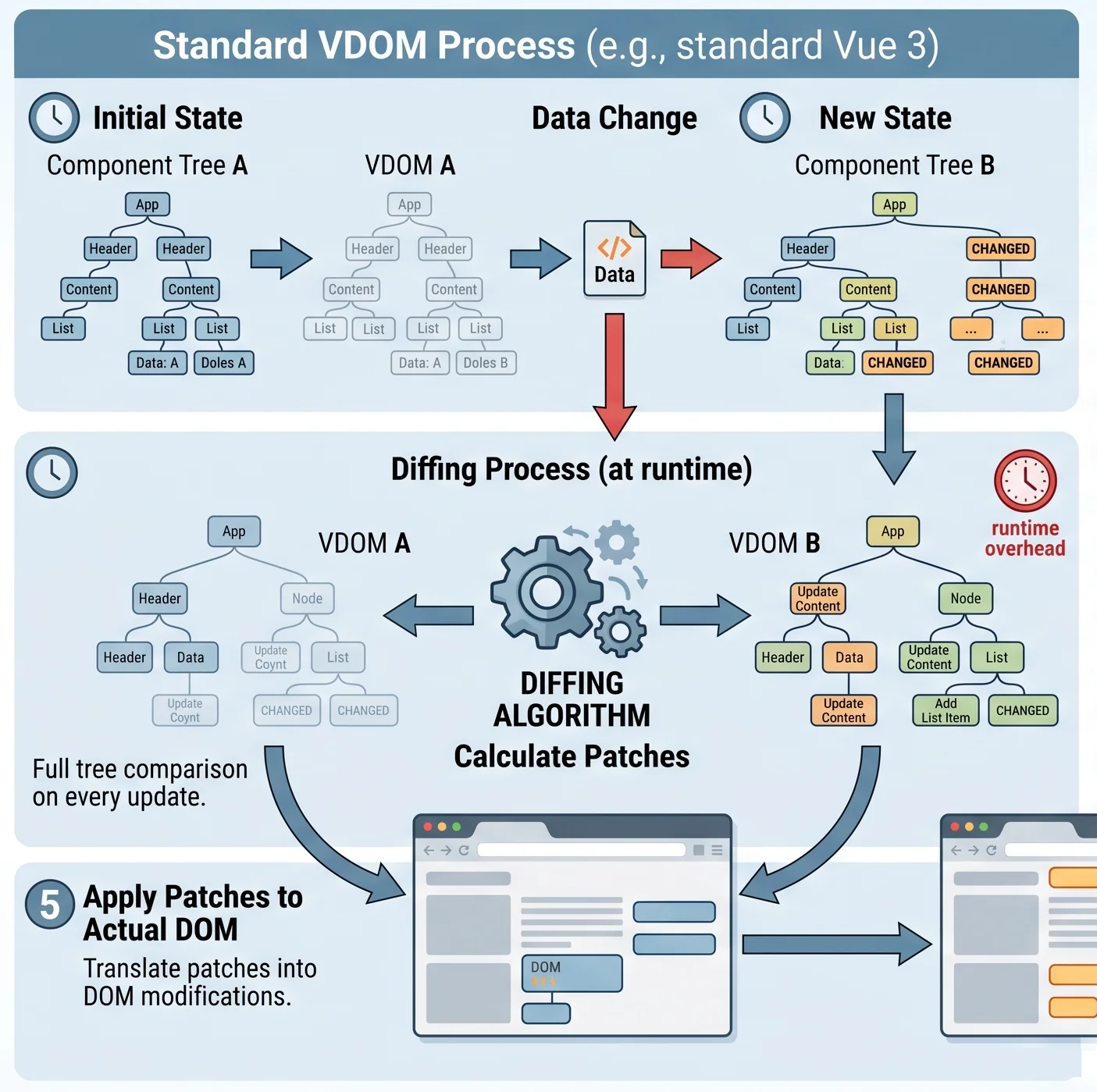
- VNode Generation: Vue runs the component render function to construct a fresh tree of lightweight JavaScript objects (Virtual Nodes).
- Tree Diffing: Vue scans the newly constructed VNode tree against the snapshot of the previous frame to calculate what changed.
- DOM Patching: Vue executes targeted native DOM updates based on the diff diffing diffing...
Vue’s compiler is aggressively optimized with patch flags to skip static subtrees. But when you’re mutating dynamic array coordinates inside a requestAnimationFrame loop at 60 (or 144) times per second, you are instantiating and immediately discarding thousands of temporary VNode objects every single frame.
The result? Garbage Collection (GC) churn. Your browser’s JS engine is continuously forced to pause execution to clean up unreferenced memory. That’s where those random micro-stutters and dropped frames come from when your app is under heavy load.
⚡ The Vapor Mode Paradigm Shift
Vapor Mode deletes steps 1 and 2 entirely.
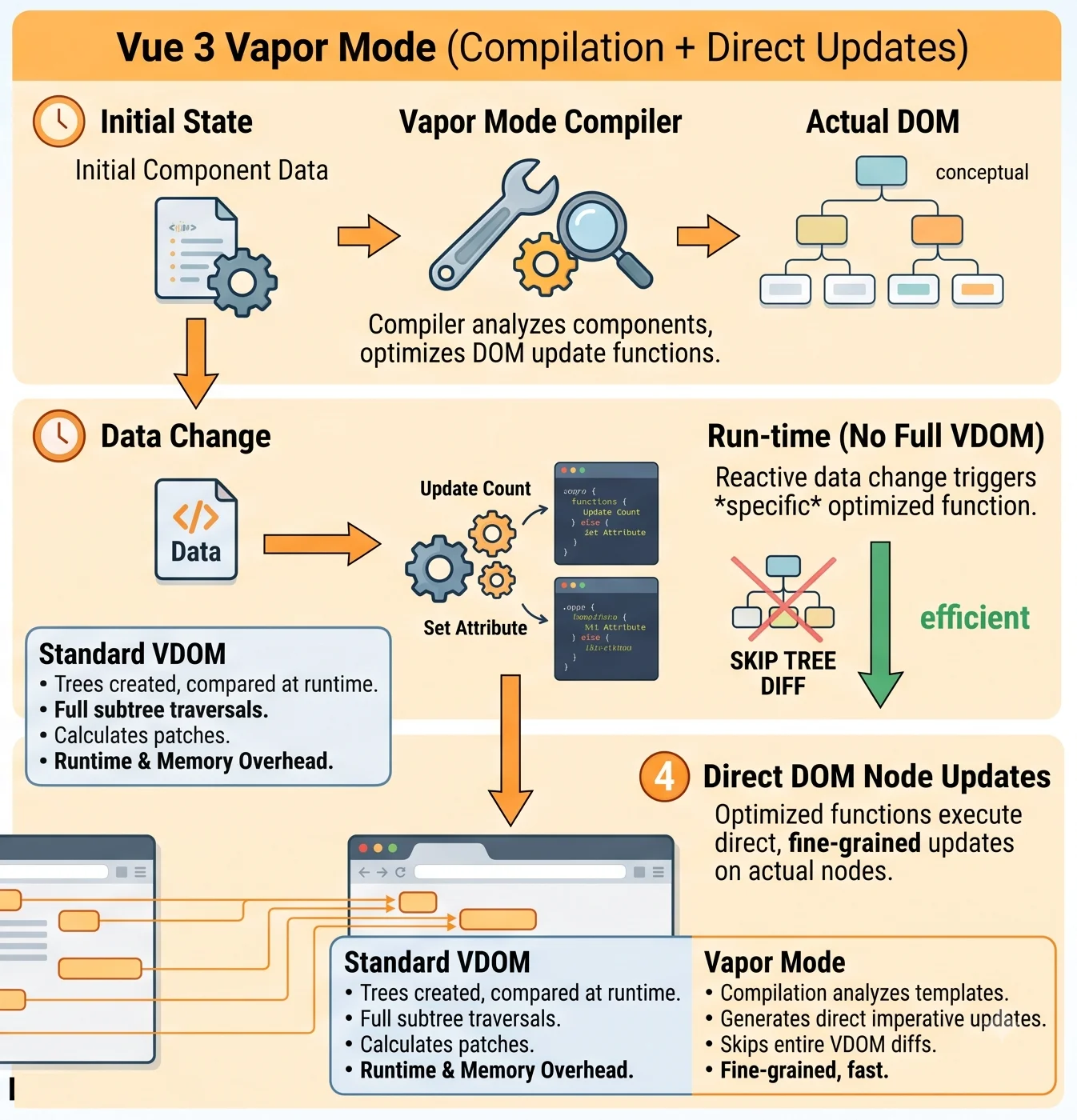
Instead of compiling your Single File Component template into a render function that spits out VNodes, the Vapor compiler parses your template directly into pinpoint, raw JavaScript DOM nodes wired straight to fine-grained signals.
When an $X$ or $Y$ coordinate updates on an animation frame:
- Standard Vue VDOM: Re-evaluates component scope, instantiates new VNodes, diffs the tree, and patches attributes.
- Vapor Mode: Invokes a single micro-function that mutates only that specific element attribute directly in the browser DOM. Zero VNodes, zero memory trash, zero diffing loops.
Best of all? Zero syntax tax. You don't rewrite your application using unfamiliar primitives. You keep
<!-- CanvasRenderer.vue -->
<script setup vapor lang="ts">
// Pure DOM updates | Zero Virtual DOM overhead!
</script>
🛠️ Step-by-Step Architecture: Upgrading the Path Engine
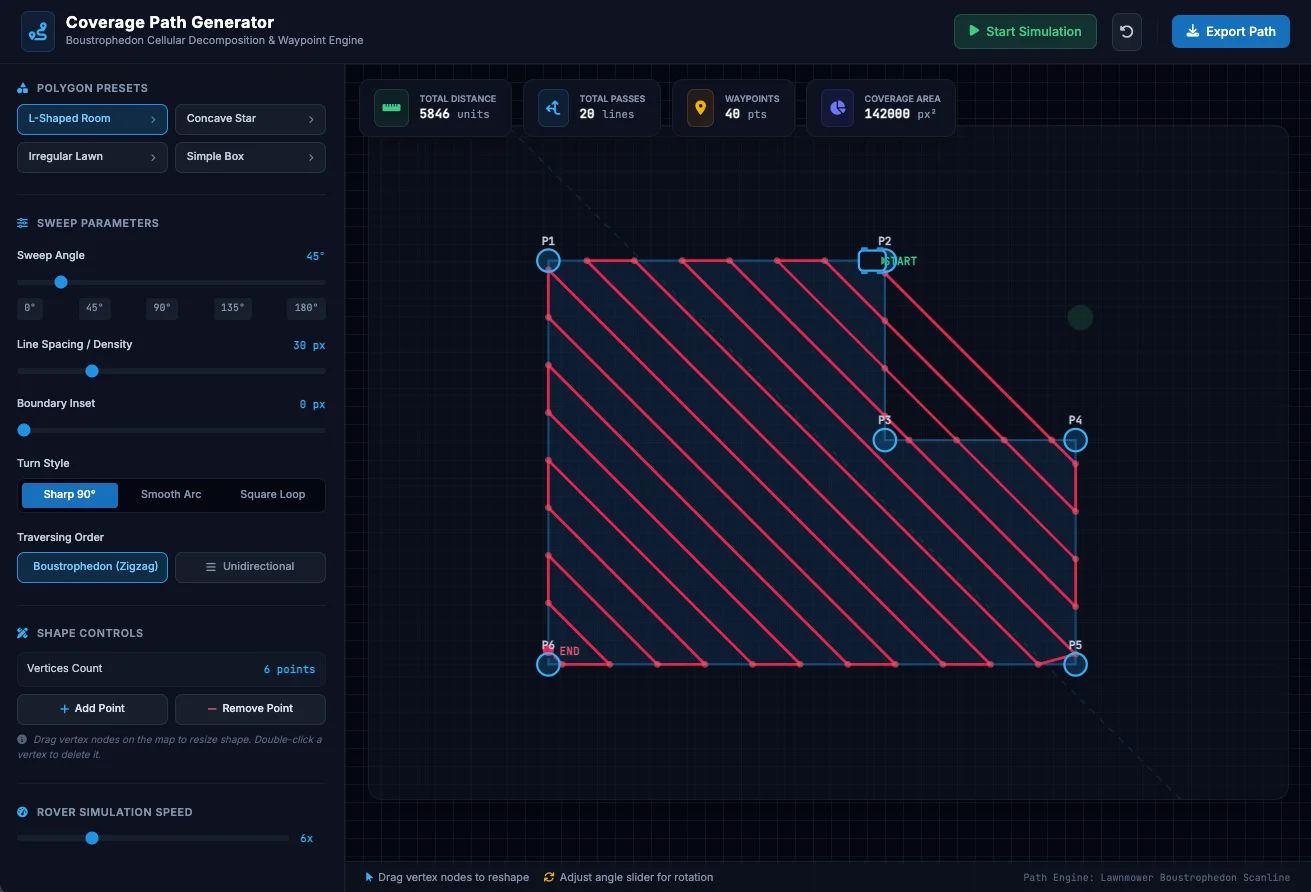
Let's look at how we refactored our monolithic coverage path generator prototype into a high-performance Hybrid Vapor architecture.
Step 1: Separate Logic into Focused Composables
Monolithic prototypes dump state, scanline math, and SVG templates into one massive component. Before introducing Vapor Mode, we extract our logic into two single-responsibility composables:
usePathfinding(): Manages polygon edge vectors, scanlines, inset paddings, and Boustrophedon sweep math.useSimulation(): Manages the 60 FPS animation loop and real-time rover vehicle telemetry.
Step 2: The shallowRef Anti-Garbage Pro-Tip
When handling arrays of points updated 60 times a second, standard Vue ref() creates deep JavaScript Proxy wrappers for every nested object. This creates massive memory overhead on dynamic arrays.
By switching to shallowRef(), we instruct Vue to track only top-level reference replacements, stripping away proxy creation overhead:
// src/composables/usePathfinding.ts
import { shallowRef, triggerRef } from 'vue'
// Vue 3 Optimization: shallowRef skips deep proxy tracking on high-frequency arrays
export const polygonPoints = shallowRef<Point[]>([...PRESETS.lshape.points])
export function updateVertexPosition(idx: number, x: number, y: number) {
const pts = [...polygonPoints.value]
pts[idx] = { x, y }
polygonPoints.value = pts
triggerRef(polygonPoints) // Explicitly inform subscribers of internal mutation
}
Step 3: Progressive Adoption via Hybrid Interop
You don't need to rebuild your navbar, sidebar sliders, or export modals in Vapor Mode. Thanks to Vue’s Hybrid Interop, standard Virtual DOM components can render Vapor components seamlessly within the same component tree.
We isolated our performance bottleneck | the interactive SVG canvas | into CanvasRenderer.vue using
<!-- App.vue (Standard VDOM Shell) -->
<script setup lang="ts">
import { usePathfinding } from './composables/usePathfinding'
import { useSimulation } from './composables/useSimulation'
import CanvasRenderer from './components/CanvasRenderer.vue' // Vapor Component!
const pathfinding = usePathfinding()
const simulation = useSimulation(pathfinding.pathPoints)
</script>
<template>
<div class="flex h-screen">
<!-- Standard VDOM Sidebar Sliders -->
<aside class="w-96 bg-slate-900 p-5">
<input type="range" v-model.number="pathfinding.angleDegrees.value" />
</aside>
<!-- Hot Path Handed Off to Pure Vapor Component -->
<main class="flex-1">
<CanvasRenderer :outer-points="pathfinding.svgOuterPolygonPoints.value" :path-d-string="pathfinding.pathDString.value" :sim-angle="simulation.simAngle.value" :sim-pos="simulation.simPos.value"/>
</main>
</div>
</template>
📈 Benchmarks: VDOM vs. Hybrid Vapor Engine
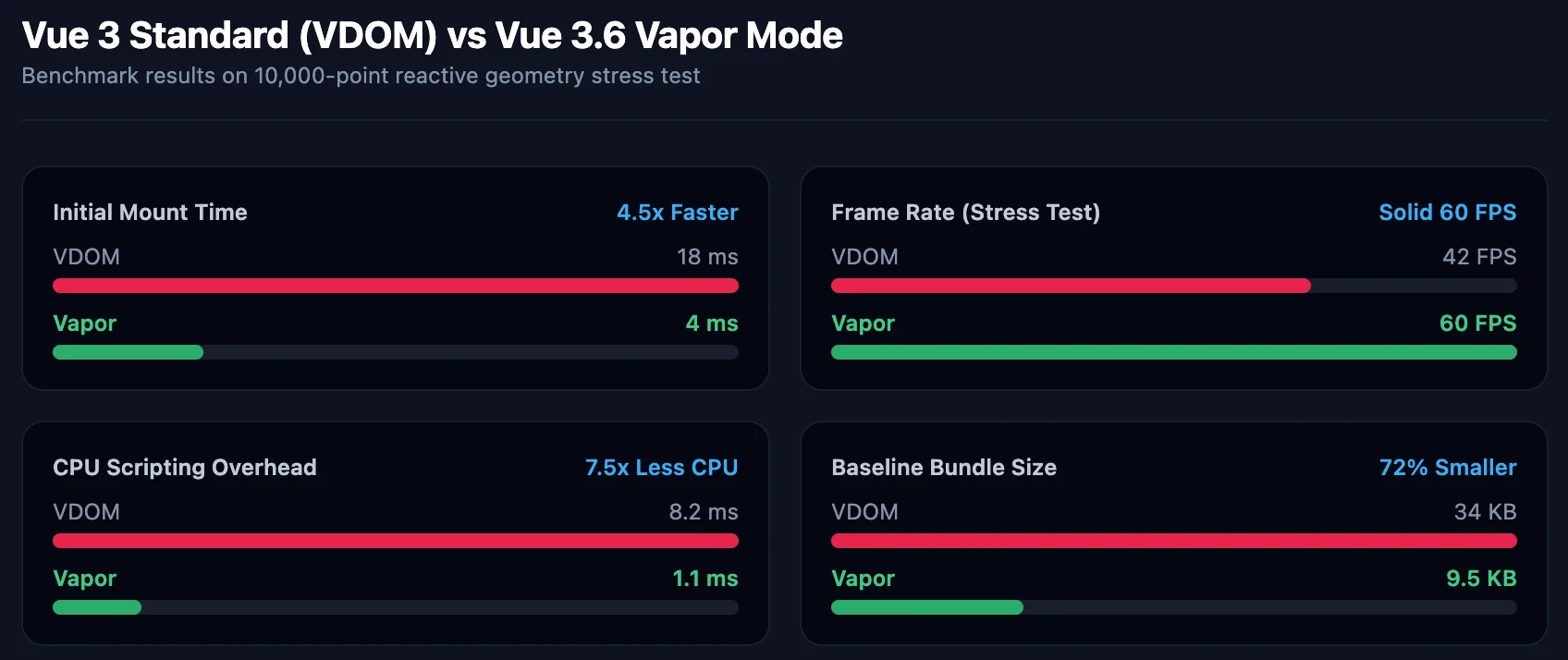
We stress-tested both implementations under extreme workload: a 10,000-point complex polygon, 50 sweep lines, and the animation loop running at 20x simulation speed.
| Metric | Standard Vue 3 (vue-old) | Vue 3.6 Vapor (vue-new) | Delta |
|---|---|---|---|
| Mounting Time | 18 ms | 4 ms | 4.5x Faster |
| FPS Under Heavy Stress | Dips to 42 FPS | Locked 60 FPS | Zero Frame Drops |
| CPU Scripting per Frame | 8.2 ms / frame | 1.1 ms / frame | 7.5x CPU Reduction |
| Garbage Collection Pauses | Frequent micro-stutters | Non-existent | Eliminated |
| Compiler Bundle Baseline | 34 KB | 9.5 KB | 72% Reduction |
The Takeaway: The 7.5x reduction in CPU scripting per frame is the real MVP here. By eliminating VNode object allocations, the browser engine spends virtually zero time doing Garbage Collection cleanups during fast animation loops.
⚠️ Real-World Reality Check: Vapor is a Compiler
Can you just drop
No. Vapor Mode is fundamentally a build-time compilation strategy.
When Vite builds your SFCs using the Vue compiler plugin, it inspects your templates. When it encounters
🏁 Final Thoughts & Resources
Vue 3.6 Vapor Mode gives us what framework engineers have wanted for years:
- Uncompromised DX: Write standard Composition API code using ref, computed, and watch.
- Maximum Performance: Direct DOM signals with zero Virtual DOM memory overhead.
- Incremental Adoption: Upgrade hot paths component-by-component without breaking your existing codebase.
Now it's your turn to audit your codebase. Where is your application dropping frames? Is it a real-time chart, a custom data grid, or a canvas editor? Upgrade that single bottleneck to Vapor Mode and leave the rest of your app untouched.
- 📖 Read the official Vue.js Vapor Core Discussions & RFCs
- 🐙 Check out the official Vue Core Documentation
- 💻 Download the full source code and benchmarks over at huement/vue_vapor_example
Drop a comment below and let us know what component you're upgrading to Vapor Mode first! Happy coding! 🚀



Comments
Add Comment
All Comments
// NO_COMMENTS_IN_BUFFER
Establish initialization protocol by creating the baseline entry trace.
System Moderation Interceptor is ON for this communication hub. All user transmission vectors must clear access protocol filtration approvals before broadcasting logs live to public network arrays.