
High-Performance Animations Without the Bloat
I really don’t need to say anything, not when I can let the green rings do the talking.
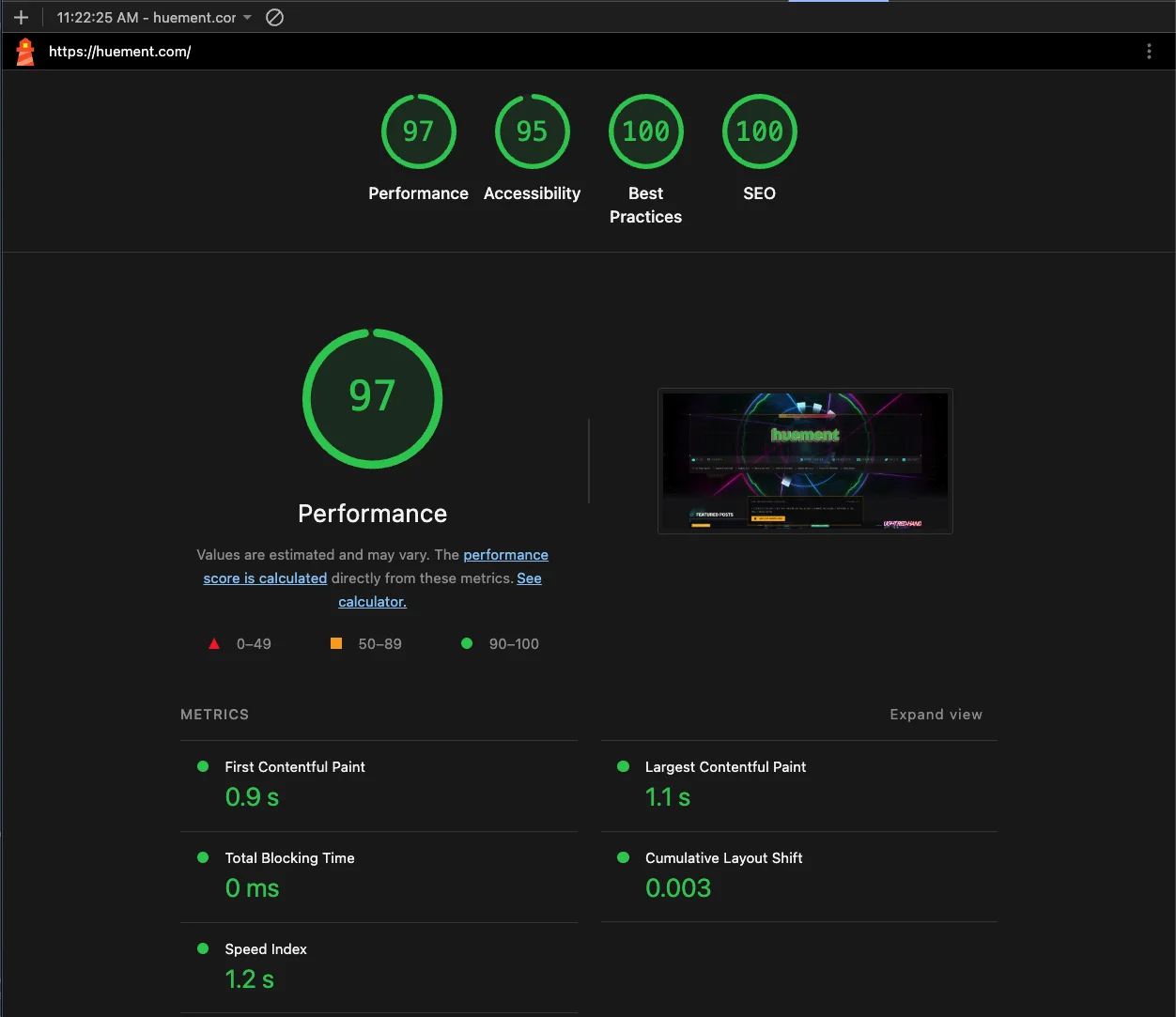
Yes that’s right, Huement.com, hosted on home-labbed hardware, splashing full screen particle animations + 3d visualizations on the front page, along with blog articles, recent YouTube visuals, links to the archives, even a few paragraph preview + featured image of the most recent story, plus a promo for my recent app TrendForge! All of that, and we still get all green.
Don’t believe me? Checkout the homepage for yourself and tell me you’re not impressed. Then let it sink in, all that content, all that perfectly SEO’d and accessible content, and we STILL have a perfect score.
For anyone thinking this is some sorta 2016 Volkswagen scam where I am gaming the test, you couldn’t. Be more wrong. It’s all legit, and I am going to explain exactly how I got there in this article. So lock in dear reader, and hopefully you’ll walk away with ideas on how to get your site up to speed… OR you could always contact us to do it for you!
OVERVIEW OF THE TOPICS COVERED
Section 1 | WebFonts: loading these wrong can wreck your scores and your user experience. We will go DEEP into how to optimize, what to optimize, and how to get them on the screen.
Section 2 | Asset Bundling. Specifically, Vite.js. Your CSS / JS files, are typically the largest things on the page, and the most prone to locking up the main render thread. Fear not friend, I will show you how to make vite.js work for you, instead of you fighting it.
Section 3 | Page Layout, HTML Tricks & Tips, <head> Tags, <script> Tags
Section 4 | Backend to Frontend Pipeline. Getting the data from the database, (caching it) and handing it off to the front end. No matter how optimized your page is, if the data takes a long time to arrive, no amount of <meta> tags or magnification is going to save you.
SECTION ONE
Slash Large Variable Font Payloads by 86%
Taking a font file from 172KB down to 24KB!
Variable web fonts are touted as the ultimate solution for site typography: a single file that gives you infinite weights and widths without loading multiple static font files. However, that convenience comes at a heavy cost.
When I downloaded Saira—a popular Google Variable Font—the starting .woff2 file came in at a massive 172KB. On a lightweight blog, dragging down page speed for a single font file was unacceptable.
Here is how I used Python's fonttools library to strip away the bloat and shrink the payload down to just 24KB while retaining full Regular-to-Bold variable responsiveness.
Why Basic Subsetting Isn't Enough for Variable Fonts
My first attempt was using pyftsubset to cut out unused characters (like Cyrillic, Greek, and complex math symbols). While dropping unused glyphs got the file size down from 172KB to around 109KB (and later 84KB with minor tweaks), it still felt disappointing. Why was a simple Latin web font still taking up 84KB?
The culprit lies inside the gvar (Glyph Variation) table.
In a variable font, glyph shapes are stored as base paths plus "delta vectors" that describe how each point moves as you adjust axes like weight or width. By default, Saira ships with:
- Weight Axis (
wght): Ranging from Thin (100) all the way to Extra Bold (900). - Width Axis (
wdth): Ranging from UltraCondensed (50) to Expanded (125).
Even if you only keep standard ASCII characters, the font file is forced to retain complex math for every character at every single extreme variation point (100, 200, 300, 800, 900, UltraCondensed, Expanded). If your blog only uses Regular (400) and Bold (700) text at normal width, you are paying a huge bandwidth penalty for extreme styles you will never render.
Step 1: Clamp Unused Variable Axes
To fix the gvar bloat, we use fontTools.varLib.instancer to slice off the unused ends of the variation axes before doing anything else.
By locking the width to 100% (wdth=100) and restricting weights strictly to 400 through 700 (wght=400:700), we tell FontTools to recalculate the outlines and throw away the vector deltas for Thin, Extra Light, Black, and Condensed styles.
Run this command in your terminal:
python3 -m fontTools.varLib.instancer fonts/saira.woff2 wght=400:700 wdth=100 -o fonts/saira-trimmed.woff2
Result: The file drops instantly from 172KB down to 58KB.
Step 2: Aggressive Subsetting and Table Stripping
Now that the variable math is trimmed down, we run pyftsubset on saira-trimmed.woff2 to remove unused glyphs, legacy alignment scripts, and non-essential layout tables.
pyftsubset fonts/saira-trimmed.woff2 \
  --output-file=fonts/saira-subset.woff2 \
  --flavor=woff2 \
  --unicodes="U+0020-007E,U+00A0-00FF,U+2000-206F,U+2074,U+20AC,U+2122,U+2191,U+2193,U+2212,U+2215" \
  --layout-features='kern','liga' \
  --no-hinting \
  --drop-tables+=DSIG,gasp,hdmx,VDMX,LTSH,prep,cvt,fpgm \
  --desubroutinize
What Each Option Does:
--unicodes="...": Restricts characters strictly to English/Standard Latin, common accents (é, ñ, ü), smart quotes, em-dashes, and basic symbols (€, ™).--layout-features='kern','liga': Keeps basic letter-spacing (kerning) and standard ligatures while discarding heavy OpenType features like fractions, small caps, and localized alternates.--no-hinting: Removes legacy instruction bytecode intended for low-resolution CRT monitors. Modern operating systems and browsers handle font anti-aliasing automatically.--drop-tables+=...: Strips obsolete metadata and rendering tables (DSIG for digital signatures, prep/cvt/fpgm for grid alignment) that web browsers ignore.--desubroutinize: Unpacks outline subroutines, allowing the WOFF2 Brotli algorithm to achieve higher compression ratios.
Result: The file reaches its final weight of 24KB.
Implementing the Optimized Font in CSS
With the file optimized, update your CSS @font-face declaration to specify the exact weight range you preserved:
@font-face {
  font-family: 'Saira';
  src: url('/fonts/saira-subset.woff2') format('woff2');
  font-weight: 400 700;
  font-style: normal;
  font-display: swap;
}
Now, any CSS rule requesting font-weight: 400 through 700 (including values in between like 500 or 600) will render smoothly, while keeping your page load blazingly fast.
High-Performance Vite Configuration Breakdown
This vite.config.js configuration is engineered specifically for maximum front-end performance, minimal bundle sizes, and optimal asset delivery in a Laravel application. Below is a detailed breakdown of the key performance optimizations implemented and why they were chosen.
The Optimization Journey
| Optimization Stage | File Size | Reduction % | What Was Removed / Modified |
|---|---|---|---|
| Base Google Font | 172 KB | 0% | Original Saira.woff2 (Full Latin/Extended glyphs, full 100–900 weight & width axes). |
| Basic Glyph Subsetting | 84–109 KB | ~37–51% | Removed foreign glyphs, math symbols, and unused language characters. |
| Axis Clamping | 58 KB | ~66% | Stripped unused weight variations (100–300, 800–900) and dropped width axis. |
| Final Subsetting & Table Stripping | 24 KB | 86% | Dropped legacy hinting bytecode, unused OpenType tables, and restricted layout features. |
SECTION TWO
1. Multi-Page Entrypoint Asset Splitting (laravel plugin)
What it does:
Instead of bundling all CSS and JavaScript into monolithic app.css and app.js files, the configuration defines explicit, granular entry points:
- Page-specific styles:
resources/css/tailwind.css,resources/css/tw-blog.css, andresources/css/audit.css. - Page-specific scripts:
resources/js/cyber-particles.js,resources/js/app.js,resources/js/welcome.js,resources/js/website-tw.js,resources/js/website-tw-blog.js,resources/js/blogpost-tw.js,resources/js/audit-form.js, andresources/js/brand-popart.ts.
Why we did it:
- Eliminates Unused Code Payload: A user reading a blog post does not load scripts or styles intended strictly for interactive forms (
audit-form.js) or canvas visualizers (cyber-particles.js). - Accelerates First Contentful Paint (FCP): Smaller initial CSS and JS bundles require less network bandwidth and allow the browser to parse and render pages much faster.
2. Dual Static Build Pre-Compression (vite-plugin-compression)
What it does:
Generates static pre-compressed versions of text assets during build time using two algorithms:
- Gzip (
.gz): Compresses JavaScript, CSS, HTML, SVG, and JSON files. - Brotli (
.br): Compresses the same file types using Google's high-efficiency Brotli algorithm.
Why we did it:
- Brotli Efficiency: Brotli achieves roughly 15%–20% higher compression density compared to standard Gzip, directly reducing byte transfers over the network.
- Zero Server Overhead: Pre-building
.gzand.brfiles allows web servers (such as Nginx usinggzip_staticorbrotli_static) to serve pre-compressed assets straight off the disk without expending server CPU cycles compressing assets on the fly.
3. Automated Build-Time Image Optimization (ViteImageOptimizer)
What it does:
Automatically losslessly/near-losslessly compresses image assets at build time:
- Runs vector SVG assets through
multipassoptimization to strip metadata, comments, and redundant vector nodes. - Compresses WebP images to an optimal
80quality target.
Why we did it:
- Lower Network Payload: Prevents unoptimized or oversized static images from leaking into production builds.
- Improved Largest Contentful Paint (LCP): Smaller image byte sizes allow primary visual elements on the page to download and render faster.
4. Production Log & Debugger Stripping (esbuild.drop)
What it does:
Instructs ESBuild to drop all console.* calls (e.g., console.log, console.error) and debugger statements from production outputs.
Why we did it:
- Main-Thread Optimization: Executing active console calls inside client browsers—especially on lower-end mobile devices—causes unnecessary memory retention and execution pauses.
- Reduced File Size: Removes extraneous string literals and debug logic overhead from final JavaScript bundles.
5. Lean Build Configuration (build object)
What it does:
sourcemap: false: Disables source map generation for production builds.modulePreload: false: Turns off Vite's default automated injection of<link rel="modulepreload">tags across output chunks.- Natural Rollup Code Splitting: Explicitly removes manual chunking rules to rely on Rollup's native code-splitting heuristics.
Why we did it:
- Prevents Unnecessary Preloading: Disabling automatic
modulePreloadprevents modern browsers from eagerly fetching secondary JavaScript chunks before they are actually required on the current page route. - Deployment Efficiency: Turning off sourcemaps reduces build execution times, reduces deployment artifact sizes, and keeps internal code architecture hidden in production.
- Avoids Over-Chunking: Removing forced
manualChunksrules prevents circular dependency bugs and fragmented micro-chunks, allowing Rollup to build optimal dependency graphs naturally.
Summary of Performance Metrics Impacted
| Feature / Plugin | Targeted Web Vital | Performance Benefit |
|---|---|---|
| Multi-Entry Splitting | FCP & LCP | Ships only page-relevant CSS and JS payloads. |
| Brotli & Gzip Pre-Compression | Network TTFB / Transfer Time | Delivers ~20% smaller files with zero server runtime CPU load. |
ViteImageOptimizer |
LCP & Speed Index | Automatically slashes SVG and WebP byte sizes. |
esbuild.drop |
TBT (Total Blocking Time) | Cleans JS main-thread execution by stripping debug calls. |
modulePreload: false |
Network Requests / Bandwidth | Stops eager loading of non-critical asset chunks. |
SECTION THREE
High-Performance Blade Layout Strategy for 100/100 Lighthouse Scores
Achieving top-tier performance scores in Google Lighthouse requires tight control over resource preloading, network requests, DOM complexity, and third-party script execution.
Below is a detailed breakdown of why this layout architecture performs so well and the critical rules behind it.
1. Key High-Performance <head> Tags
The head section utilizes targeted resource hints to prioritize critical assets before rendering:
Font Preloading (<link rel="preload" as="font">):
<link rel="preload" href="{{ asset('fonts/saira-subset.woff2') }}" as="font" type="font/woff2" crossorigin />
Preloading the subsetted WOFF2 font with as="font" and crossorigin forces the browser to fetch the typography asset immediately during the initial network sweep. This completely eliminates FOUT (Flash of Unstyled Text) and prevents layout jumps (CLS / Cumulative Layout Shift).
Targeted CDN Preconnecting (preconnect & dns-prefetch):
<link rel="dns-prefetch" href="//s3-api.huement.com" />
<link rel="preconnect" href="[https://s3-api.huement.com](https://s3-api.huement.com)" crossorigin />
By warming up the DNS resolution, TCP handshake, and TLS negotiation for remote asset domains (s3-api.huement.com) ahead of time, asset fetch latencies later in the page render cycle are drastically reduced.
Responsive Viewport Meta Tag:
<meta name="viewport" content="width=device-width, initial-scale=1.0" />
Essential for mobile accessibility and mobile-first responsive rendering audits.
2. What NOT To Do: Avoid the Third-Party Font & DNS Trap
❌ Anti-Pattern: External Google Fonts Integration
<!-- DO NOT DO THIS FOR MAXIMUM LIGHTHOUSE SCORES -->
<link rel="preconnect" href="[https://fonts.googleapis.com](https://fonts.googleapis.com)">
<link rel="preconnect" href="[https://fonts.gstatic.com](https://fonts.gstatic.com)" crossorigin>
<link href="[https://fonts.googleapis.com/css2?family=Saira:[email protected]&display=swap](https://fonts.googleapis.com/css2?family=Saira:[email protected]&display=swap)" rel="stylesheet">
Why external font fetching hurts Lighthouse scores:
- Multiple Domain Roundtrips: External font loaders require extra DNS lookups and TLS handshakes across two separate domains (fonts.googleapis.com for CSS and fonts.gstatic.com for binary .woff2 files).
- Unnecessary CSS Render-Blocking: The browser must download and parse Google's external CSS file before it even learns where the .woff2 font files are located.
- Bloated Payloads: Google Fonts often sends larger generic character subsets or full variable axis range vectors.
✅ The Optimized Approach Used Here:
Self-host your custom-subsetted font asset (saira-subset.woff2) directly on your own domain or asset CDN, and preload it with a single local tag.
3. Third-Party Script Management (Non-Blocking Analytics)
Third-party scripts like Google Tag Manager can derail performance if executed synchronously.
async + defer Execution:
<script async src="[https://www.googletagmanager.com/gtag/js?id=G-6MLT5TBKMP](https://www.googletagmanager.com/gtag/js?id=G-6MLT5TBKMP)" defer></script>
Adding both async and defer ensures that analytical scripts are fetched in the background without blocking HTML parsing or delaying First Contentful Paint (FCP).
Environment Gating:
@if (app()->environment('production'))
    <!-- Google tag (gtag.js) -->
@endif
Wrapping analytics scripts in production environment checks prevents unnecessary script execution, external tracking calls, and console noise during local development or automated CI/CD testing audits.
4. DOM Tree & Structural Optimizations
- Server-Side Conditional Rendering: Instead of rendering hidden HTML nodes with CSS rules like display: none (which bloats the DOM node count and causes extra browser style recalculations), Blade evaluates condition logic on the server (
$isHUDLayout,$isBigVariantLayout) and only injects necessary DOM structures. - Semantic Accessibility Attributes: Using explicit landmark tags like role="complementary" and aria-label="Advertisement" ensures a 100 Accessibility score on Lighthouse audits without needing extra JavaScript hooks.
- Deferred Script Loading at Document Bottom: Non-critical scripts (tailwind-foot, tailwind-page-scripts) are placed at the very end of the element to ensure visual DOM assets render before scripts execute.
Tag Audit Matrix Reference
Tag / Feature Performance Impact Lighthouse Metric Improved Fetches critical font immediately from local assets. CLS (Cumulative Layout Shift) & FCP Pre-establishes socket connections for asset CDN. TTFB (Time to First Byte) & LCP async + defer on Prevents third-party scripts from blocking parsing. TBT (Total Blocking Time) Self-Hosted WOFF2 Subset Cuts external DNS/TLS negotiation chains. Speed Index & LCP[cite: 3] Server-Side Blade Guarding Keeps DOM depth lean and eliminates unused nodes. DOM Size & Style Recalculation Time
SECTION FOUR
The Backend-to-Frontend Pipeline
Dumb Views, Smart Services, and Maximum Cacheability
In modern high-performance web applications, one of the most effective architectural rules is simple: Keep your views completely dumb.
A Blade template should never execute database queries, parse Markdown, calculate reading times, run DOM manipulation scripts, or resolve complex object fallbacks. All data manipulation, business logic, image dimension calculation, and schema generation belong strictly on the backend.
By processing, normalizing, and flattening content into plain PHP arrays inside controllers and services before it hits the view layer, we unlock a massive performance superpower: Full Payload Caching.
1. The Core Architecture: Separation of Concerns
Our frontend architecture follows a strict, one-way data pipeline:
By the time a Blade view receives a variable (like
$dataor$post), zero further operations are required. The view simply reads the keys and outputs the HTML.
2. Heavy Lifting on the Backend:
getArchives()Statamic
Entryobjects carry heavy overhead: augmented field values, taxonomy relationships, custom drivers, and lazy-loading hooks. Passing these raw objects directly to Blade views causes N+1 query problems and makes response caching almost impossible due to serialization bugs.Inside
PageController::getArchives(), we fetch all published posts in a single query and immediately flatten them into a clean, primitive PHP array:// PageController.php return $allPosts->map(function ($entry) { // 1. Author & Taxonomy Normalization$authorData = [ 'name' => $name, 'slug' => $authorValue->slug ?? $authorValue->id(), 'initials' => ContentRenderer::generateInitials($name), ];// 2. Pre-calculating fallback image URLs & CDN endpoints $listImageUrl = !empty($thumbnailImageUrl) ? $thumbnailImageUrl : (!empty($best_image_url) ? $best_image_url :$defaultCard); // 3. Pre-computing styling & layout helper properties $bgColor = ColorMapHelper::twBackgroundColorCode($aoiColor, 'bg-zinc-500'); // 4. Pre-parsing titles & reading times return [ 'id' => $entry->id(), 'display_title' => $entry->get('sub_title') ? $blogHelper->createLongTitle(...) :$entry->get('title'), 'read_time' => ContentRenderer::estimateReadTime($entry->get('content')), 'excerpt' => \Str::limit(strip_tags($entry->get('content') ?? ''), 150), 'list_image_url' =>$listImageUrl, 'bg_color' => $bgColor, 'author' => $authorData, 'a_o_i' => $aoiData, ];});
Why doing this on the backend matters:
- Pre-Calculated Titles & Excerpts: Instead of writing ternary operators or string-limiting logic inside the Blade view, $post['display_title'] and $post['excerpt'] are ready out of the box.
- Pre-Resolved Styles: Tailwind background color fallbacks ($post['bg_color']) are assigned in PHP, removing complex logic conditionals from class attributes.
- Primitive Serialization: Converting complex Statamic Entry instances into plain PHP arrays ensures the payload can be cleanly stored in Redis or memory caches without broken object references.
3. DOM Manipulation & Content Processing inContentRenderer
Dynamic HTML features like lazy loading, lightbox modal anchors, drop-caps, and image dimension injection (width and height to prevent Cumulative Layout Shift) are computationally expensive.
Instead of processing text inside Blade directives, the ContentRenderer service runs these heavy operations in PHP using DOMDocument and regex before caching:// ContentRenderer.php public static function adjustImages(string $html): string { $doc = new DOMDocument(); @$doc->loadHTML('<?xml encoding="UTF-8">' . $html, LIBXML_HTML_NOIMPLIED | LIBXML_HTML_NODEFDTD);// Loop through images, inject native lazy loading, compute width/height, wrap in Lightbox links foreach ($images as$img) { $img->setAttribute('loading', 'lazy');$img->setAttribute('decoding', 'async'); self::setImageDimensions($img,$imageUrl); // Prevents Layout Shift (CLS) // Wrap with Lightbox markup $anchor = $doc->createElement('a');$anchor->setAttribute('data-toggle', 'lightbox'); // ... } return $doc->saveHTML();}
By computing image dimensions (getimagesize) and mutating the DOM on the server during payload warming, the client receives fully optimized, shift-free HTML with zero frontend rendering overhead.
4. The Superpower: Seamless Cacheability
Because all data transformation happens on the backend and results in pure, primitive data structures, we can wrap entire controller payloads inside Cache::remember:
// PageController.php
private function getHomepagePayload(): array
{
    return Cache::remember('homepage_data_v3', now()->addMinutes(15), function () {
        app(HomepageCacheService::class)->warm();
        return Cache::get('homepage_data_v3');
    });
}
When a user visits the homepage:
1 Cache Hit: Laravel pulls the pre-built, fully-normalized $data array from cache in under 2ms.
2 Database & Service Bypass: No Statamic queries, database lookups, read-time calculations, or DOM parsers run.
3 Instant View Delivery: The controller hands $data to view('welcome', compact('data')), which simply echoes pre-computed strings into HTML.5. What the View Actually Sees: Pure Presentation
Because the backend did all the heavy lifting, the Blade template (welcome.blade.php) remains clean, readable, and lightning-fast.
Example: Dumping Pre-Built Schema
@section('seo')
    <script type="application/ld+json">
        {!! $data['schema'] !!}
    </script>
@endsection
No schema builder classes or JSON encoders in the template—just a direct echo.
Example: Iterating Pre-Formatted Posts
@foreach ($data['featuredPosts'] as$post)
    @if ($post)
        <x-card_split
            :post="$post"
            :bgColor="data_get($post, 'bg_color', 'bg-zinc-500')"
            tags="false"
        />
    @endif
@endforeach
Components simply bind to pre-calculated properties like $post['list_image_url'], $post['bg_color'], and $post['read_time'.
Summary of Benefits
Aspect Doing Logic in View (Anti-Pattern) Doing Logic in Backend / Service (Our Pattern) View Cleanliness Cluttered with @php blocks, string helpers, and DB calls. Minimal, declarative Blade markup. Cache Efficiency Cannot easily cache complex view state or database models. Entire payload array is cached in Redis for up to an hour. Response Speed Slower First Contentful Paint (FCP) due to runtime computations. Sub-10ms response times served straight from cache memory. Lighthouse Score Prone to CLS due to late image dimension or metadata resolution. High scores guaranteed by pre-injecting layout attributes server-side.
Summary
If you’re still reading, thanks for sticking with it. This was a fairly long article. Hopefully it helped you, or you found something you can use in your own projects. Please let me know what you thought, leave a comment with some feedback!
I know I mentioned this at the start, but if you do need some help getting your own site optimized, use the contact form or hit me up on social media, I would love to help you with your project, and above all, don’t get discouraged. You’re probably going to need a few iterations to get everything perfect.
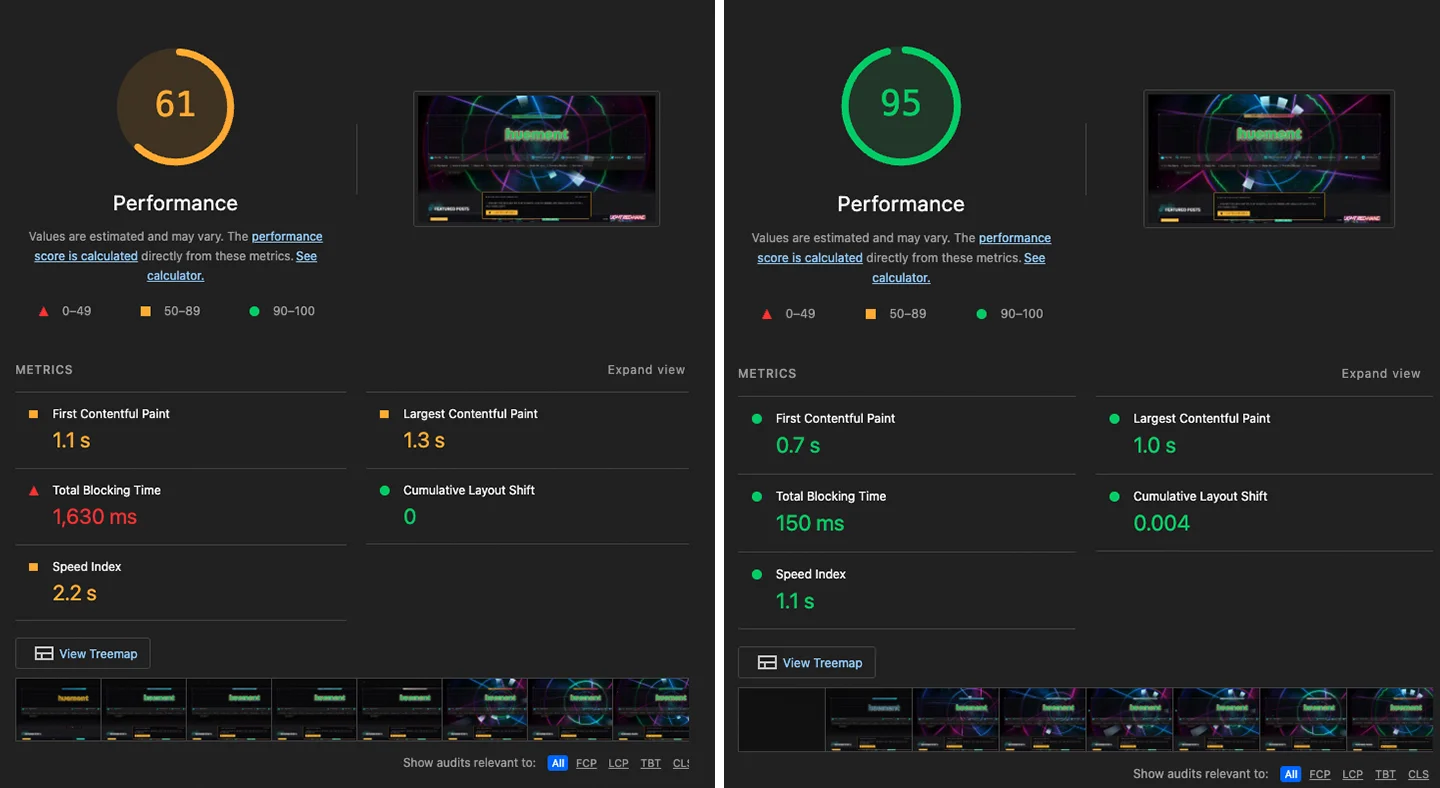
Here is a final parting image, one of my favorite “new” memes. How it started vs how its going:
Tools & Resources
-
FontTools GitHub Repository — The core Python library used for font manipulation, including
pyftsubsetandvarLib.instancer. -
Glyphhanger GitHub Repository — A popular Node.js web font utility wrapper that automates web page glyph discovery using Puppeteer and
pyftsubset. -
Google Fonts Saira — The base variable font family used in this tutorial.
-
Wakamai Fondue — A web tool to inspect font files, discover hidden variable axes, view available layout features, and check font tables.
-
PageSpeed Insights — Google's performance testing tool to audit Web Vitals, performance scores, LCP, and CLS font-loading impact.
-
MDN Web Docs: @font-face — Official documentation for configuring CSS
@font-facerules,font-display, andfont-weightrange descriptors. -
MDN Web Docs: unicode-range — Complete reference for standard Unicode character ranges and hex codes.
-
CanIUse: WOFF2 — Browser support matrix and compatibility table for WOFF2 web fonts.
-
mtownsend/read-time on Packagist — The PHP package used to compute estimated reading times during payload preparation[cite: 7].
-
Stevebauman/Purify on GitHub — HTML Purifier wrapper used to sanitize raw Markdown HTML and post excerpts[cite: 7].
-
PHP DOMDocument Documentation — Built-in PHP class used for server-side DOM parsing (injecting
loading="lazy", calculating image dimensions, and auto-wrapping Lightbox anchors)[cite: 7]. -
Statamic CMS Documentation — The hybrid flat-file CMS powering the content entry queries and taxonomy management[cite: 5].
-
Laravel Cache Documentation — Reference for backend payload caching and warmers using
Cache::remember[cite: 5]. -
Schema.org Validator — Validation tool for verifying
@graphJSON-LD schema structures generated on the backend[cite: 5].


Comments
Add Comment
All Comments
// NO_COMMENTS_IN_BUFFER
Establish initialization protocol by creating the baseline entry trace.
System Moderation Interceptor is ON for this communication hub. All user transmission vectors must clear access protocol filtration approvals before broadcasting logs live to public network arrays.