
Annihilate tasks and problems that once would have destroyed you
At its core, TransformersPHP is crazy simple simple.simple.simple. Its a high-level pipeline() function that handles everything: downloading the model, preprocessing your input, running inference, and post-processing the output. One or two lines of code, and you're done.
Here's a quick example for sentiment analysis. By Sentiment analysis btw, I mean is this a happy or sad string of text. That’s a simple question to ask, but much more complicated to answer. Before having an AI toolkit to answer that, it would have been a lot more than 2 simple lines. So lets see how we are doing that today.
use function Codewithkyrian\Transformers\Pipelines\pipeline;
$pipe = pipeline('sentiment-analysis');
$result = $pipe("I love TransformersPHP!");
// Returns: ['label' => 'POSITIVE', 'score' => 0.9998...]
Now pay close attention, because that is incredibly modular. You can swap in any compatible model, like a multilingual one or a quantized version for speed, and do WAAAY more than setting a boolean isHappy. TransformersPHP supports tons of tasks: text classification (I. E. From this list of categories where does this belong?, translation, summarization, question answering, zero-shot classification (aka making categories from nothing), text generation (yes, even small Llama models), image-to-text, object detection, and more.
Now, the cool part—what's under the hood? TransformersPHP doesn't reinvent the wheel. It runs models in the ONNX format (Open Neural Network Exchange), a universal standard that works no matter if the model was originally trained in PyTorch, TensorFlow, or JAX.

Inference happens through ONNX Runtime, a blazing-fast engine optimized for CPU and hardware acceleration. The PHP side connects to it using the PHP FFI extension (Foreign Function Interface), which lets PHP call native C++ code from ONNX Runtime directly. This keeps things lightweight and performant. Many models are quantized by default for smaller size and faster execution.
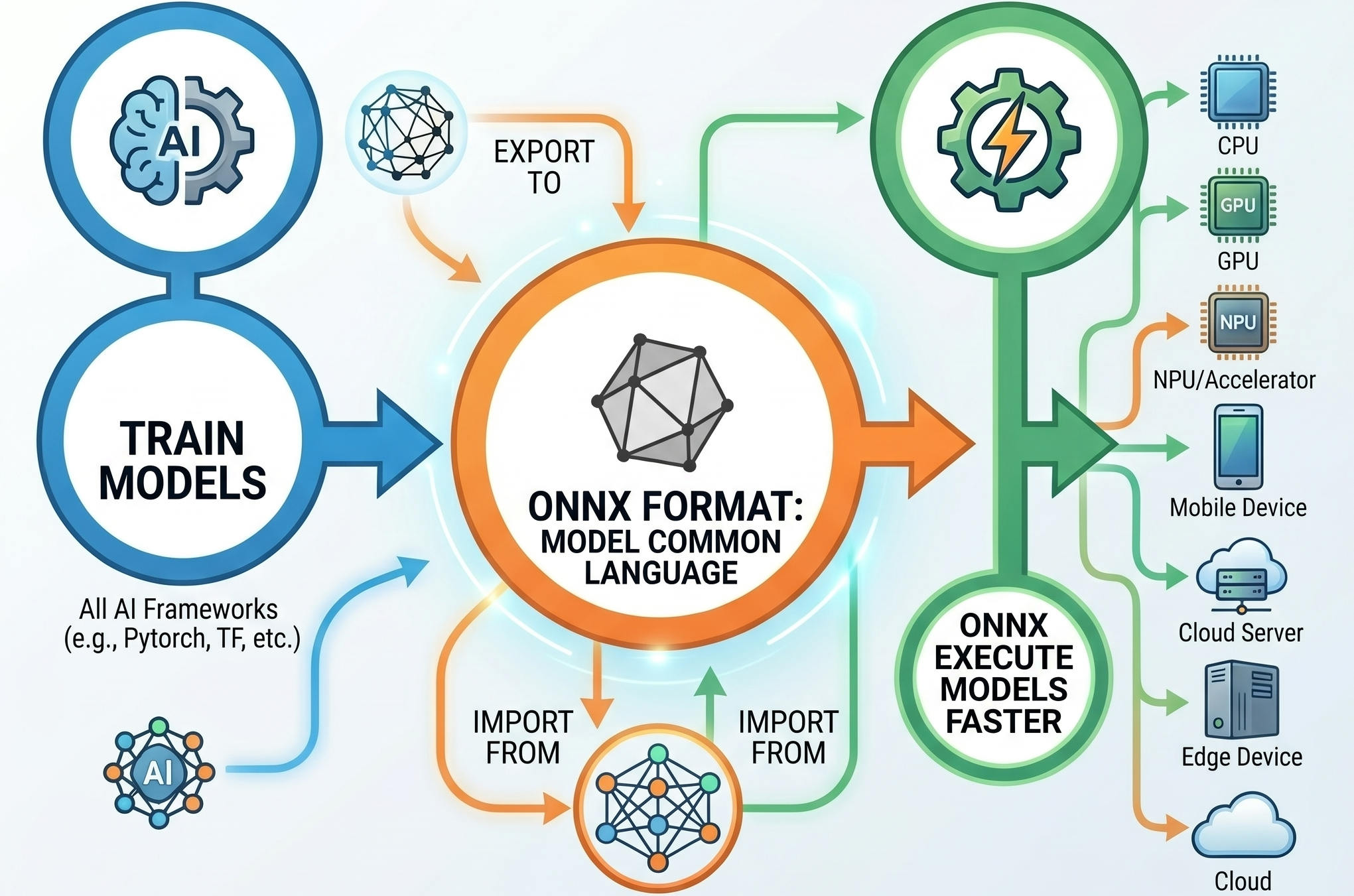
Dynamic DUO
So that’s what the majority of this video is going to be about. How to pair TransformersPHP with ONNX to do some really cool stuff without much work on our part. Now the majority of the stuff I’m going to talk about, is also able to be accomplished with Javascript via Xenova/transformers.js as well as Python and just about any other major language. This video is going to use PHP because I already made a video about using ONNX with Python. There is a link to that video and project in the description, it’s a really cool example of doing Text to Speech on really basic hardware and have the result come out sounding almost 100% human.
Okay back on track to TransformersPHP. Originally I had a huge chunk of this video to really get into the weeds about ONNX and Transformers, but instead of all that, I want to just show you cool stuff.
Like I mentioned earlier, you need PHP 8.1 and have the FFI Extension enabled. If that’s Good to go, then you’re good to.
All that’s left is a lil composer package install like this:
composer require codewithkyrian/transformers
And thats it, it’s all up to you for what kind of model you want to load and what kind of tasks you want to accomplish. So let’s get into that now before you get bored and dip.
Automatic Content Tagging / Zero-Shot Classification (e.g., Auto-Tagging Blog Posts, Support Tickets, or Products)
What it enables now:
If you’re working with user uploaded content, or Blogging, or numerous other times where tagging comes up, this new workflow is life changing. With this we can instantly tag content with any categories you want — without training a custom model or calling external APIs.
Example flow:
- A user writes a blog post or submits a support ticket.
- You run zero-shot-classification with candidate labels like "technology", "marketing", "finance", "health", "legal".
- The model returns the best-matching tags with confidence scores.
- You auto-apply tags, route the ticket, or recommend related content.
Why it was really hard before:
- Traditional approaches required either:
- Manually writing complex keyword/rule-based systems (brittle and incomplete).
- Training your own classifier (needed Python, data labeling, ML expertise, and ongoing maintenance).
- Using paid cloud APIs (OpenAI, Google, etc.) — which meant sending sensitive user data externally, paying per request, and adding latency + dependency on third-party uptime.
- Zero-shot classification (understanding new categories on the fly) was almost impossible in pure PHP.
Real impact: Many Laravel tutorials now show this for auto-tagging posts. It's fast enough for background jobs and keeps everything private and offline after the first model download
use function Codewithkyrian\Transformers\Pipelines\pipeline;
// Create the pipeline (uses a good default model, or specify one like 'Xenova/mobilebert-uncased-mnli')
$classifier = pipeline('zero-shot-classification');
// Example: Auto-tag a blog post or support ticket
$text = "Our new iPhone 16 has an amazing camera and battery life that lasts all day.";
$result = $classifier($text, [
'technology',
'marketing',
'finance',
'health',
'product_review',
'customer_support'
]);
// $result contains labels with confidence scores
print_r($result);
One more task, images. Adding images to a page is about as basic as web dev tasks get. We’ve all done it. What we HAVENT all done, is added the correct “ALT” tag to the image. I think it’s safe to say that more often than not, people are leaving the alt tag unfilled. Now while SEO tools like lighthouse have done a great job of stick and carrotting devs into adding the tags, even getting your score dinged is often not enough incentive. Well fear not fellow slackers, with the wondrous power of these Transformers, image alt tags are now easy peasy.
Check out this simple workflow.
use function Codewithkyrian\Transformers\Pipelines\pipeline;
// Create the image captioning pipeline
$captioner = pipeline('image-to-text');
// Generate alt text for an uploaded image
$imagePath = 'storage/uploads/product-photo.jpg';   // or a URL
$result = $captioner($imagePath);
// The result contains the generated caption
$altText = $result[0]['text'] ?? 'Image description unavailable';
echo $altText;   // Example: "A red sports car driving on a mountain road at sunset"
The default model is usually Xenova/vit-gpt2-image-captioning, and you’re not limited to local images, you can pass a remote URL instead. For real world use cases, I’m sure you can see where this would be killer as a queue’d job that ran after upload, or via an api call after upload while the user is still confirming it. There are a number of ways you could work this into your app in a non-block manner, and each one is going to not only improve your SEO scores, more importantly for people that rely on alt tags to get around, its going to VASTLY improve their experience using your site. A real win-win for everyone involved.

There is this old XKCD comic from 240 years ago where cueball asks ponytail to write an app that determines if a given picture is (1) taken in a national park, and (2) a picture of a bird. For the first task, he says no problem, couple days, the second task, he claims would require a team of post graduate developers and five years.
LMAO!!!!! What simpler times they were back in the stick figure days.
Using these transformers, a figging raspberry pi can figure this out and we don’t need more than 25 lines of code. And this is me saying that, for a real pro, they could prolly one liner this shit nowadays.
use function Codewithkyrian\Transformers\Pipelines\pipeline;
// Using the known map of all national parks
$sql = "SELECT id, name FROM locations WHERE ST_Contains(geom, ST_SetSRID(ST_Point(:lng, :lat), 4326)) LIMIT 1";
$stmt = $pdo->prepare($sql);
$stmt->bindParam(':lng', $longitude); $stmt->bindParam(':lat', $latitude);
$stmt->execute();
$location = $stmt->fetch(PDO::FETCH_ASSOC);
echo $location ? "The coordinate is inside: " . $location['name'] : "The coordinate is outside all defined locations.";
// 2. Classify the description
$captioner = pipeline('image-to-text', 'Xenova/vit-gpt2-image-captioning');
$classifier = pipeline('zero-shot-classification', 'Xenova/bart-large-mnli');
$imagePath = 'path/to/your/maybe_bird_image.jpg';
// We provide "bird" and some distractors to see what matches best.
$candidateLabels = ['bird', 'human', 'building', 'vehicle'];
$classification = $classifier($generatedText, $candidateLabels);
// The results are sorted by score (highest first)
$bestMatch = $classification['labels'][0]; $confidence = round($classification['scores'][0] * 100, 2);
// 3. Final Check
if ($bestMatch === 'bird' && $confidence > 60) { echo "Result: 🐦 Bird detected with $confidence% confidence."; } else { echo "Result: No bird detected. Closest match: $bestMatch."; }
With that pseudo-ish php script we can grab the image location, compare against a list of know locations via our PostGIS database, and then with our image to text transformer, and the text to category transformers we just looked at, solve that whole problem. In five minutes not five years. That is pretty freaking incredible. This is the point I’m trying to get across, with these transformers, not only do you not need a team of doctoral comp sci engineers to solve this stuff, you also no longer a closet full of GPUs running flat out, and you can answer really complex problems, like, Is there a bird in this photo and was it taken in a nation park? Incredible!
What else ya got?
Alright now it’s time for my favorite part of the video WHAT ELSE YA GOT. Where we talk about, yes you guessed it, what else do I have to say about this topic. This is where we do a little bit deeper of a dive, now that we are all on topically on the same page.
So here is What else you can now EASILY do with local models that a year or two ago would have been a spaghetti nightmare. Yes don’t be afraid, the spaghetti monster can’t hurt you unless you let it. Like a vampire you have to invite him in, so uhh, don’t do that.
Besides sentiment-analysis, here are some of the most popular and useful pipelines you can use with this package. All of them run locally using ONNX Runtime. Im going to kinda run through this pretty quick just to give you an idea. I will have a link in the description to the huement.com blog, where you can find links to these models are more details about how to use them and all that coding stuff.
Here are the most useful pipelines people are running today. I’ll go through each one quickly, tell you what it does, why you might care, and give you a real-world use case.
1. Text Generation
Generate new text from a starting prompt. You can use it to write blog ideas, product descriptions, stories, or even continue conversations.
Recommended models:
Xenova/TinyLlama-1.1B-Chat-v1.0— fast and surprisingly capableXenova/gpt2Xenova/codegen-350M-mono— great for code generation
<?
use function Codewithkyrian\Transformers\Pipelines\pipeline;
// other models available such as  TinyLlama, Phi-2, etc.
$generator = pipeline(
'text-generation',
'Xenova/Llama-3.2-1B'
);
$result = $generator(
"Once upon a time",
maxNewTokens: 150,
temperature: 0.7
);
// Returns generated text continuation
?>
2. Question Answering
Give the model a piece of text (like a document or article) and a question — it extracts the exact answer from that text.
Perfect for:
- Building smart FAQs
- Document search
- Chatbots that understand your own data
<?
use function Codewithkyrian\Transformers\Pipelines\pipeline;
$qa = pipeline('question-answering');
$context = "The Eiffel Tower is located in
Paris, France. It was completed in 1889.";
$result = $qa(
question: "Where is the Eiffel Tower located?",
context: $context
);
// Returns: ['answer' => 'Paris, France', 'score' => 0.99...]
?>
3. Fill-Mask
Predicts missing words in a sentence. Think of it as smart autocomplete or “fill in the blank”.
Example: “The new iPhone has an amazing MASK and battery life.”
Helpful for autocomplete features, content moderation, and contextual spell-checking.
<?php
use function Codewithkyrian\Transformers\Pipelines\pipeline;
// Load the fill-mask pipeline
$fillMask = pipeline(
'fill-mask',
'Xenova/distilbert-base-uncased'
);
$sentence = "The new iPhone has an
amazing [MASK] and battery life.";
$result = $fillMask($sentence, topK: 5);
print_r($result);
/*
Example Output:
Array
(
[0] => Array
(
[score] => 0.8923
[token] => camera
[token_str] => camera
[sequence] => The new iPhone has an
amazing camera and battery life.
)
[1] => Array
(
[score] => 0.0451
[token] => screen
[token_str] => screen
...
)
)
*/
4. Named Entity Recognition (NER)
Extracts real-world entities from text such as:
- People’s names
- Company names
- Locations
- Dates
- Email addresses
Great for turning messy text into structured data, extracting contact info, or improving search.
use function Codewithkyrian\Transformers\Pipelines\pipeline;
// Alternative good model:
// 'Xenova/dbmdz-bert-large-cased-finetuned-conll03-english'
$ner = pipeline('token-classification', 'Xenova/bert-base-NER');
$text = "Elon Musk announced that Tesla will open a
new factory in Berlin next year on March 15th.";
$result = $ner($text);
print_r($result);
/*
Typical Output:
Array
(
[0] => Array
(
[entity] => B-PER   // Beginning of Person
[score] => 0.9987
[index] => 1
[word] => Elon
)
[1] => Array
(
[entity] => I-PER
[word] => Musk
)
[2] => Array
(
[entity] => B-ORG
[word] => Tesla
)
[3] => Array
(
[entity] => B-LOC
[word] => Berlin
)
)
*/
Alright so all of those tasks were not very fun without using these cools local AI tools. But that’s not all, there are plenty of other tasks,
6. Summarization
Takes a long article, report, or support ticket and creates a short, readable summary.
Very useful for news sites, summarizing long customer messages, or creating TL;DR versions of content.
$summarizer = pipeline('summarization', 'Xenova/bart-large-cnn');   // or a smaller model
$longText = "Long article text here...";
$result = $summarizer($longText, maxLength: 130, minLength: 30);
// Returns: [['summary_text' => 'Short summary here...']]
7. Feature Extraction / Sentence Embeddings
Turns sentences into numerical representations (embeddings) that capture their meaning.
This enables:
- Semantic search (“find similar articles”)
- Finding duplicate content
- Clustering related posts or products
- Building recommendation systems
Popular fast model: Xenova/all-MiniLM-L6-v2
8. Vision & Multimodal Pipelines
TransformersPHP also supports vision and audio tasks:
- Image Classification (
image-classification) — Identifies what’s in a photo - Object Detection (
object-detection) — Locates multiple objects inside an image - Image-to-Text (image captioning) — Generates descriptive captions or alt text for images (excellent for accessibility and SEO)
- Automatic Speech Recognition (
automatic-speech-recognition) — Powered by Whisper models, turns spoken audio into text
Again, any of the things I’ve just mentioned, those pipelines work with just one or two lines of code and run locally !
Hopefully this video has entertained you, and maybe inspired you to tackle some stuff that maybe you were thinking was going to be either really hard, or really expensive. You certainly can grab a Gemini API key and solve all these problems with paid for tokens, but as you’ve seen, it doesn’t have to be that way.
That’s about all I have for you today!


Comments
Add Comment
All Comments
// NO_COMMENTS_IN_BUFFER
Establish initialization protocol by creating the baseline entry trace.
System Moderation Interceptor is ON for this communication hub. All user transmission vectors must clear access protocol filtration approvals before broadcasting logs live to public network arrays.